
Utilities Windows
Victoria SSD/HDD
Inspect HDD and SSD information, read SMART data and scan drive surfaces with Victoria, a free Windows diagnostic utility with advanced, potentially destructive repair tools.
- Operating system
- Publisher lists Windows 2000, XP, 7, 8 and 10; Windows 11 compatibility not established
- Architecture
- Windows x86 and x64; PIO unavailable on x64
- Download package
- ZIP archive
Administrator rights required. Publisher lists 1 GB RAM and recommends a 1280 × 1024 display. NVMe access requires suitable drivers; USB bridge and controller support can limit commands and SMART data.
Link checked · Download guidance
What is Victoria SSD/HDD?
Victoria SSD/HDD helps investigate storage devices through drive identification, SMART attributes and logs, and surface scans. It can show a drive's model, firmware and interface details, then present scan results as a block map or speed graph. The publisher describes support for HDDs, SSDs, memory cards and USB-connected storage, with NVMe and SAS/SCSI support in the 5.x series. Device and controller support determines which information is available.
Use the results to investigate a drive, not as a guarantee that its data is protected. Victoria also includes a disk editor, erase operations and defect-repair functions that can write to storage. These are not interchangeable with diagnostic reading. The publisher warns that even reading a failing drive can worsen damage: if it holds valuable data and shows signs of failure, stop using it and seek specialist recovery before attempting scans or repairs.
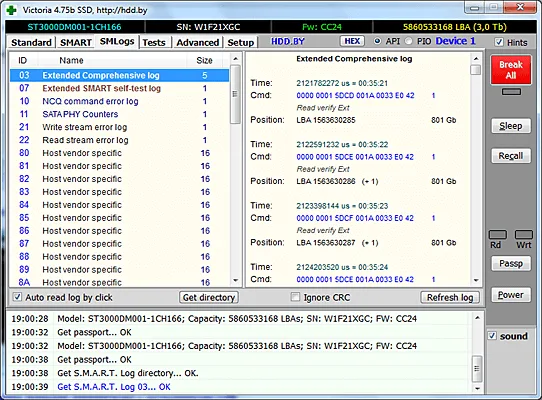
The linked publisher ZIP is Victoria 5.37, dated October 14, 2021. The official requirements list Windows through Windows 10 in x86 and x64 editions; PIO access is unavailable on Windows x64 and administrator rights are required. Windows 11 compatibility is not established by these sources. The screenshot is the publisher's historical Victoria 4.75b SMART-log example, not a capture of version 5.37 or a test performed by SoftGalaxy.
What it offers
- Read drive identification details, including model, serial number, firmware and interface information.
- Inspect SMART attributes and internal logs, with support for starting supported drive self-tests.
- Scan storage surfaces and display results as a block map or speed graph.
- Access supported USB-connected HDDs and SSDs; the 5.x series also supports NVMe and SAS/SCSI devices.
- Use English, Russian, Ukrainian or Spanish interface translations listed for version 5.37.
Good to know
- Erase, disk-editor and defect-repair operations can destroy data. Even diagnostic reading can worsen a failing drive; valuable data takes priority over testing.
- USB bridges, controllers and drivers affect available commands and SMART information; SAS/SCSI health reporting is described as experimental in version 5.37.
- PIO mode is not available on Windows x64. The official requirements do not establish Windows 11 support.
Product images
Sources
References used for this listing. Retrieval dates do not indicate hands-on testing.
More in utilities
View category ↗HDD Regenerator 2011
Scan hard drives for bad sectors and view drive health information with HDD Regenerator. This download is the publisher-linked 2011 Windows trial, not the separately sold 2024 edition.

Hard Disk Sentinel 6.40
Monitor HDD and SSD health, temperatures and S.M.A.R.T. changes with Hard Disk Sentinel for Windows. This entry links to the publisher's Standard edition setup ZIP.
CheckDrive 2026.7
Check HDD and SSD health, inspect S.M.A.R.T. information and find file-system errors with CheckDrive for Windows. The free edition includes ads; background monitoring requires Plus.

Wise Disk Cleaner 11.4.0
Remove temporary files and browser traces with Wise Disk Cleaner, a free Windows cleanup utility with scheduled cleaning and drive optimization tools.
Samsung Magician 9.0.1.950
Monitor Samsung SSD health, check firmware updates and benchmark supported drives with Samsung Magician for Windows.