
Utilities Windows
MyLanViewer Network/IP Scanner
Find computers, IP and MAC addresses, and shared folders on a Windows LAN with MyLanViewer, a paid network scanner with a trial and portable ZIP option.
- Operating system
- Windows 10 and 11; XP, Vista, 7, 8 and Windows Server versions also listed
- Architecture
- 32-bit or 64-bit Windows, as listed by publisher
- Download package
- Portable ZIP archive (trial)
The selected link is the portable edition, not the separate web-setup EXE. Publisher says .NET Framework is not required; individual Windows builds are not specified.
Link checked · Download guidance
What is MyLanViewer Network/IP Scanner?
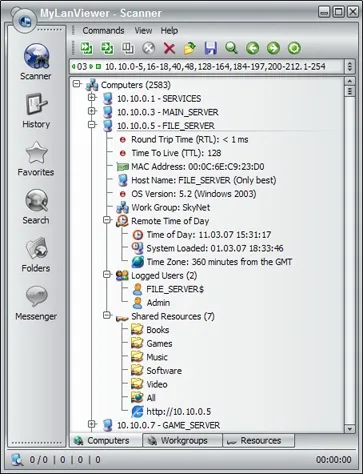
MyLanViewer Network/IP Scanner helps you inspect computers on a wired or Wi-Fi local network. Its buddy-list-style results group device details such as host names, IP and MAC addresses, network-adapter vendors, logged-in users and shared folders. That makes it useful for checking which machines are present and locating the network resources they expose.
Beyond an inventory scan, the publisher lists subnet monitoring with alerts for newly detected devices, external-IP change notifications, rogue DHCP server detection and remote power controls. These are publisher-described capabilities, not results of hands-on testing. The screenshot illustrates the Windows interface and its expandable computer details; it is not evidence of the exact interface in version 6.7.9.
The linked download is the publisher’s portable ZIP package rather than its separate web-setup executable. Both editions are listed as trials. Evaluation is free, but continued use beyond the trial requires payment; this is not a freeware license. The publisher lists support for 32-bit and 64-bit Windows, including Windows 10 and 11, and says .NET Framework is not required.
What it offers
- Scan wired and Wi-Fi LANs for computer names, IP addresses, MAC addresses and shared folders.
- Browse expandable device details, including network-adapter vendor, OS information and logged-in users.
- Monitor the subnet and receive alerts when new devices are found.
- Monitor external IP changes with email notifications and detect rogue DHCP servers.
- Use publisher-listed remote power controls and shared-folder management tools.
Good to know
- Trial software: payment is required to continue using it beyond the evaluation period; the cited download page does not specify the trial duration.
- The publisher screenshot is an illustrative older Windows interface, not a confirmed capture of version 6.7.9.
Product images
Sources
References used for this listing. Retrieval dates do not indicate hands-on testing.
More in utilities
View category ↗
Bopup Scanner 2.1.9
Find computers on a LAN, view NetBIOS user names, MAC and IP addresses, and export scan results with Bopup Scanner, a free portable Windows utility.

Advanced IP Scanner
Find devices on a local network, view IP and MAC addresses, open shared folders and export results with Advanced IP Scanner, a free Windows network scanner.

Advanced Port Scanner 2.5.3869
Find open ports on network computers, identify services and open shared resources with Advanced Port Scanner, a free Windows network utility from Famatech.
SoftPerfect Network Scanner 26.9
Discover network devices, inspect open ports and shared folders, and export inventories with SoftPerfect Network Scanner for Windows. The trial displays up to 10 devices.
USB Network Gate 11.0.2772
Share USB peripherals over a network and access them from another Windows computer. The free version shares one local device for non-commercial use; paid licenses support broader use.