
Utilities Windows
Network Activity Indicator
Show incoming and outgoing network activity with an XP-style two-monitor tray icon on Windows 7–11. Monitor all interfaces or select one in the settings.
- Operating system
- Windows 7–11, according to IT Samples
- Architecture
- 64-bit; separate 32-bit packages available
- Download package
- ZIP containing the self-install executable
Selected download is the 64-bit setup package with publisher-described uninstall support. Standalone ZIP packages are separate. Exact Windows build requirements are not stated by the publisher; no installation was performed.
Link checked · Download guidance
What is Network Activity Indicator?
Network Activity Indicator puts a flashing two-monitor icon in the Windows system tray so you can see when network packets are being sent or received. IT Samples describes support for Windows 7–11. The settings let you indicate traffic across all available interfaces or choose a particular interface, with options for the icon style and blink duration. It suits a quick visual check of network activity without keeping a monitoring window open.
Run the standalone executable to add the tray icon, then right-click that icon to customize the settings. The publisher also offers a setup package with uninstall support; the download linked here is the 64-bit setup ZIP, not the standalone ZIP. Separate 32-bit packages are available on the same official product page.
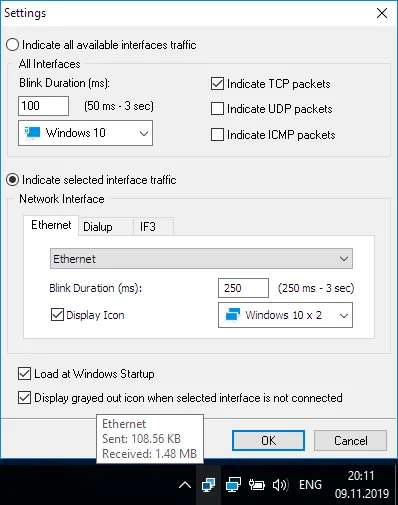
Treat the flashing icon as an activity signal, not a connection-health verdict: packets being sent or received do not establish that a particular website or service is reachable. The publisher's screenshot shows interface selection, TCP/UDP/ICMP indication choices and a startup option, but it is an illustrative settings view rather than proof of the current build running on every supported Windows version.
What it offers
- Indicate incoming and outgoing network packets with a flashing two-monitor system-tray icon.
- Show traffic for all available interfaces or choose an individual interface in the settings.
- Adjust blink duration and icon style from the tray icon's settings.
- Choose TCP, UDP and ICMP packet indication in the illustrated all-interface settings.
- Use publisher-provided language files by placing NetworkIndicator.lng beside the application.
Good to know
- A flashing traffic icon does not verify that a particular website or service is reachable.
- The linked setup ZIP is the 64-bit package; 32-bit Windows requires a different package from the publisher.
- Free use is conditional under IT Samples' license; redistribution and technical support on customer computers require a commercial license.
Product images
Sources
References used for this listing. Retrieval dates do not indicate hands-on testing.
More in utilities
View category ↗addLEDs 2.0.0.6
See and toggle Caps Lock, Num Lock and Scroll Lock with on-screen indicators. addLEDs offers several display modes for Windows 10 and 11, with a 30-day full-function trial.

CapsLock Indicator 3.16.1.2
See Caps Lock, Num Lock and Scroll Lock status in the Windows system tray, with optional on-screen notifications when a key changes.
AnVir Task Manager 9.4 (publisher-listed; installer version not inspected)
Inspect Windows processes, services and startup programs with AnVir Task Manager Free, which combines resource monitoring with delayed-startup controls.

Volumouse 2.21
Adjust Windows sound volume with your mouse wheel using Volumouse, a freeware utility with configurable key, mouse-button and taskbar rules.

GCompris 26.2
Practice reading, arithmetic, science and computer skills with GCompris, a free educational activity suite for children aged 2 to 10 on Windows.