
Utilities Windows
O&O Lanytix
Discover devices on your local network with O&O Lanytix, a free portable Windows tool that lists IP and MAC addresses, response times and device history.
- Operating system
- Windows 10 and Windows 11
- Architecture
- Not specified on the cited publisher pages
- Download package
- Portable EXE application
Publisher lists Windows 10 and 11 but no minimum build or CPU architecture on the cited pages. Discovery and detail depend on network reachability and permissions.
Link checked · Download guidance
What is O&O Lanytix?
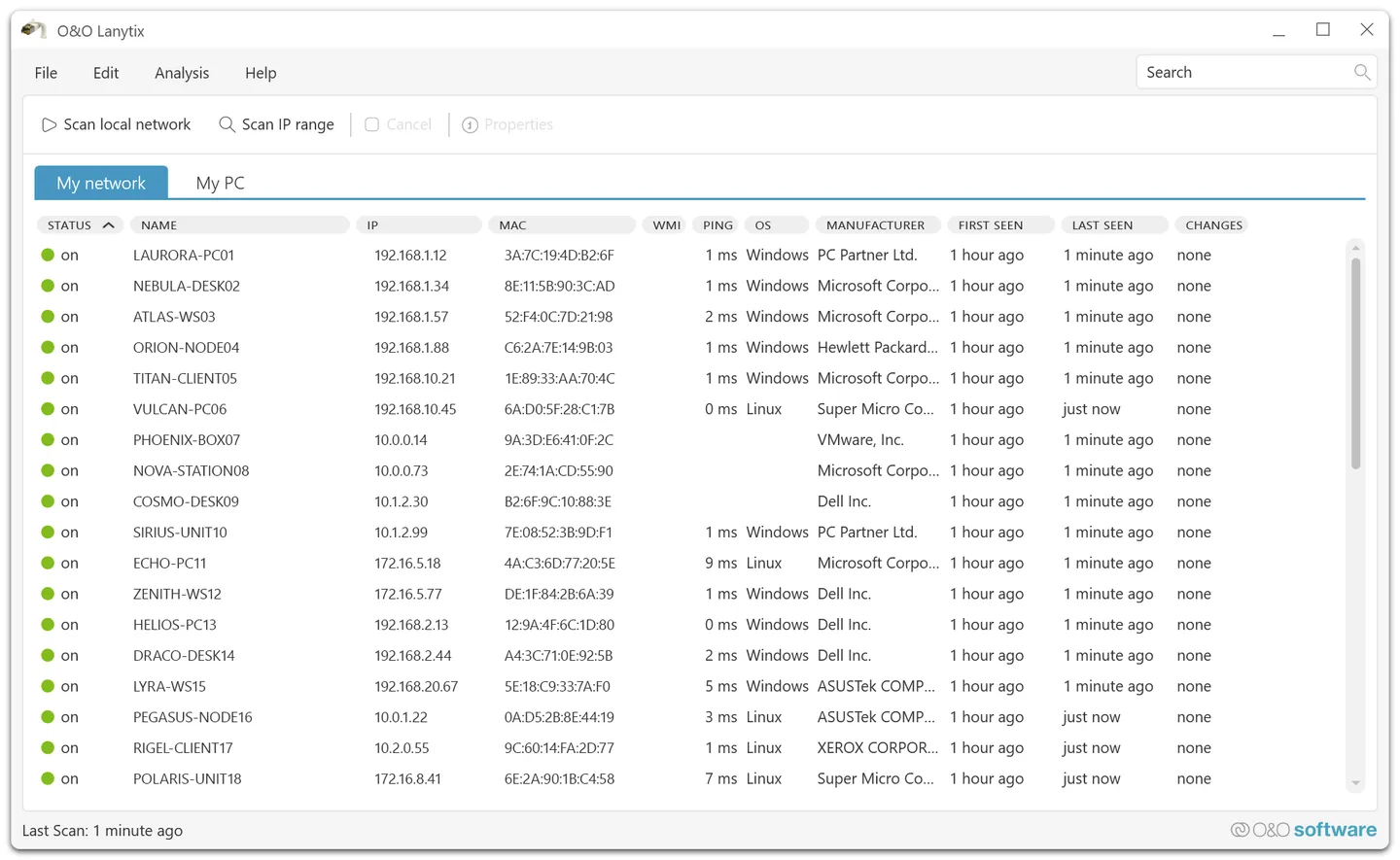
O&O Lanytix scans a local network to help you identify connected computers, printers, routers and other reachable IP devices. Its device list brings together names, IP and MAC addresses, response times and, where detectable, operating systems and network-card manufacturers. It is a portable freeware application for Windows 10 and 11.
The history is useful when you need more than a single inventory: it records when a device was first and last detected and logs changes such as a different IP address. The publisher also documents scanning defined IP ranges, assigning your own device names and copying device information to the clipboard. These options make it useful for comparing an unfamiliar device with your existing network records.
A scan is not a complete inventory of everything connected. Sleeping devices, blocked responses, firewall rules, inaccessible subnets and limited permissions can prevent discovery or hide details. Visibility across VLANs depends on routing and network configuration; detailed WMI queries require suitable authorization. Treat a missing result as a reason to check reachability, not as proof that the device is absent.
What it offers
- Discover reachable devices on the local network or scan defined IP ranges.
- View IP and MAC addresses, response times and available operating-system or manufacturer details.
- Keep first-seen and last-seen history and log changes to device settings.
- Assign custom device names and copy device information to the clipboard.
Good to know
- Devices may be missed when asleep, blocked by firewalls, unable to answer queries or outside reachable network ranges.
- Manufacturer and system details depend on the device; detailed WMI queries require authorization.
Product images
Sources
References used for this listing. Retrieval dates do not indicate hands-on testing.
- O&O Lanytix - O&O Software GmbH ↗Retrieved
- Support - O&O Software GmbH ↗Retrieved
- What's New - O&O Software GmbH ↗Retrieved
- Features - O&O Software GmbH ↗Retrieved
- Screenshots - O&O Software GmbH ↗Retrieved
More in utilities
View category ↗Slitheris Network Discovery 1.2.42
Discover network devices from Windows, inspect operating-system and device-type hints, and export scan results with Slitheris. Free use covers 50 devices; larger networks require a paid license.

PortScan 2.05
Find network devices and open ports with PortScan, a free Windows utility with ping, traceroute, DNS lookup and connection-speed tools.
LGTV Companion 5.7.0
Synchronize a network-connected LG WebOS TV with your Windows PC's power and idle states using LGTV Companion, a free, open-source utility.
Flashpaste 6.6
Store reusable replies, addresses and code snippets in Flashpaste, a Windows text-template tool with formatted text, macros and a 30-day trial.
Winpinator 0.1.2
Send files and folders across your local network with Winpinator, an unofficial Windows port of Linux Mint's Warpinator.