
Utilities Windows
Slitheris Network Discovery
Discover network devices from Windows, inspect operating-system and device-type hints, and export scan results with Slitheris. Free use covers 50 devices; larger networks require a paid license.
Version 1.2.42 · Direct publisher file
Link checked · Download guidance
What is Slitheris Network Discovery?
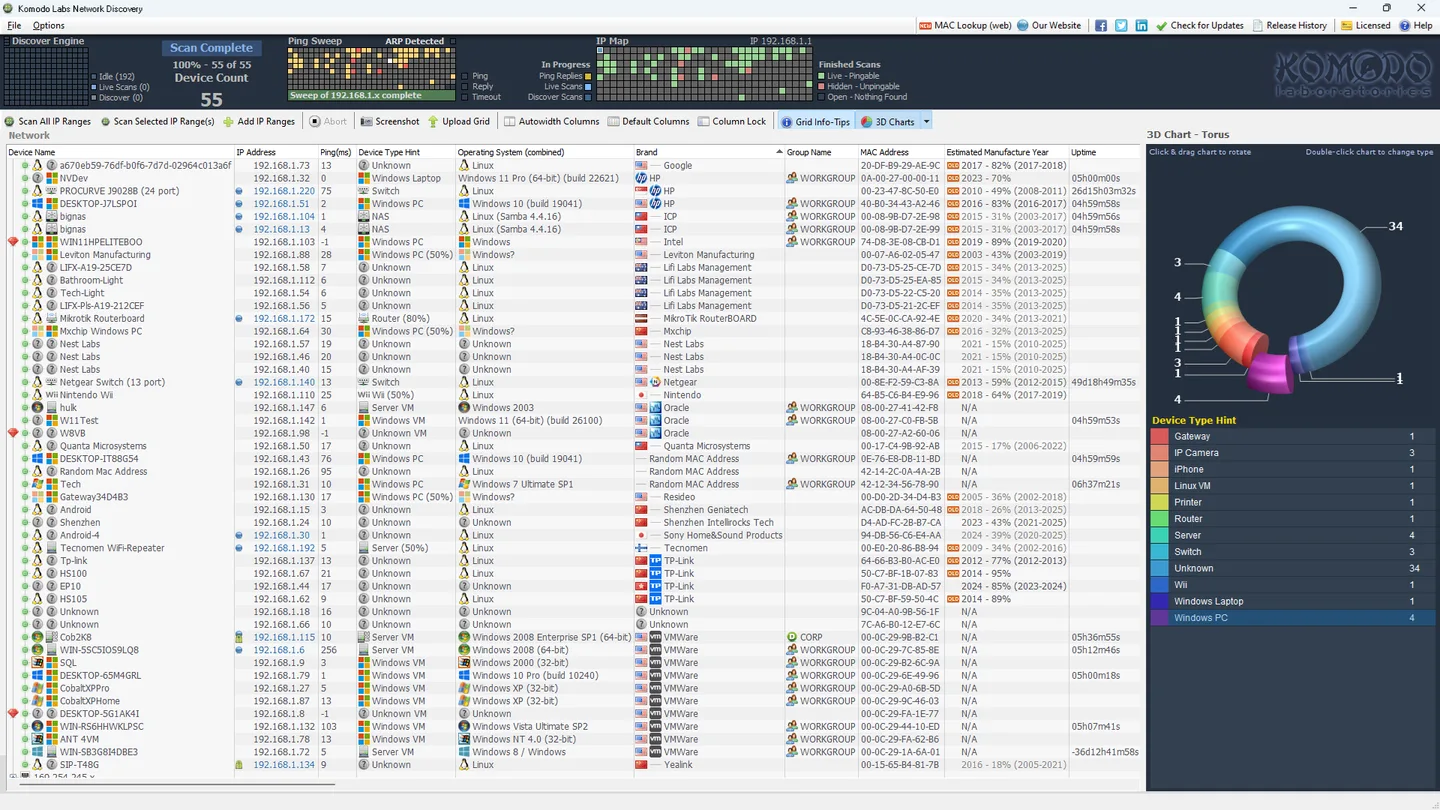
Slitheris Network Discovery from Komodo Labs builds a device overview by scanning IP ranges from a Windows PC. Its dashboard combines a visual ping sweep and IP map with a sortable device grid. The publisher describes agentless discovery that can identify operating systems, device names and other network details without installing software on each remote device or supplying remote login credentials. This makes it useful for an initial network inventory or an MSP visiting a customer site.
The useful distinction is between discovery and certainty. Device-type hints are educated guesses, and device age is an estimate derived from MAC-address information. The grid helps identify entries worth investigating rather than proving every device's identity. Scan results can be exported to CSV from the File menu, and a portable copy can be created for use with a local administrator account.
The free allowance covers 50 network devices. The publisher says scanning continues beyond that count for evaluation, but larger-network use requires paid licensing. Credential-free remote discovery also does not mean the scanning PC needs no privileges: the release history makes local administrator rights mandatory from version 1.2.28. Active scans may trigger IDS or IPS alerts; obtain permission before scanning a network.
The publisher release history lists version 1.2.42 dated May 25, 2025. The download below is the publisher's unversioned Windows EXE endpoint. Its response was checked with HEAD only; the installer was not downloaded, inspected or run, so its embedded version and CPU architecture were not independently verified.
What it offers
- Inspect a visual ping sweep, IP map and device grid while scanning network ranges.
- Use agentless operating-system fingerprinting and device-name discovery without remote login credentials for supported information.
- Review device-type hints, MAC-address vendor information and estimated device manufacture years.
- Export scan results to CSV from the File menu.
- Create a portable copy for use on a PC with a local administrator account.
Good to know
- Free use covers 50 network devices; scanning beyond 50 is offered for evaluation, not an unlimited free license.
- Device-type identification is described as experimental, and device age is an estimate rather than a confirmed manufacture date.
- Local administrator rights are required from version 1.2.28, despite credential-free discovery of supported remote information.
- Active scanning can trigger IDS or IPS alerts. Scan only networks you are authorized to assess.
Product images
Sources
References used for this listing. Retrieval dates do not indicate hands-on testing.
More in utilities
View category ↗O&O Lanytix
Discover devices on your local network with O&O Lanytix, a free portable Windows tool that lists IP and MAC addresses, response times and device history.

WhoIsConnectedSniffer 1.30
Discover devices on your local network by listening to their packets with WhoIsConnectedSniffer, a free Windows utility that requires a capture driver.

Nmap 7.993
Discover network hosts, inspect ports and identify services with Nmap for Windows, a network discovery and security auditing tool with the optional Zenmap graphical interface.
SoftPerfect Network Scanner 26.9
Discover network devices, inspect open ports and shared folders, and export inventories with SoftPerfect Network Scanner for Windows. The trial displays up to 10 devices.


MiTeC Network Scanner 6.1.0
Find network devices, check open TCP and UDP ports, and inspect shared resources with MiTeC Network Scanner for Windows. Unregistered use is free for non-commercial purposes.