
Utilities Windows
PDFtk
Merge, split, rotate and process PDF documents from the Windows command prompt with PDFtk Server, the original command-line PDF toolkit.
- Operating system
- Windows 10 and 11
- Architecture
- Not specified on the publisher product page
- Download package
- EXE installer
Standalone PDFtk Server command-line package. Publisher-supported systems are listed here; no installation or runtime testing was performed.
Link checked · Download guidance
What is PDFtk?
PDFtk Server handles PDF page operations through commands rather than a graphical editor. It suits repeated document-processing jobs: joining several PDFs, extracting selected pages, collating scanned pages or filling and flattening PDF forms. The Windows download here is the standalone PDFtk Server installer, not PDFtk Free, PDFtk Pro or PDFTK Builder. Adobe Acrobat and Reader are not required.
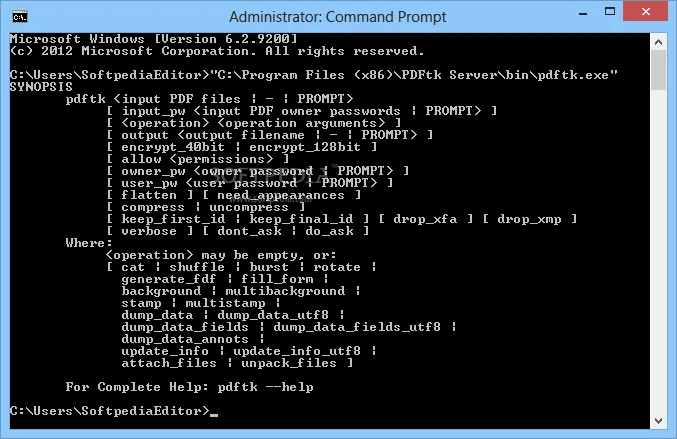
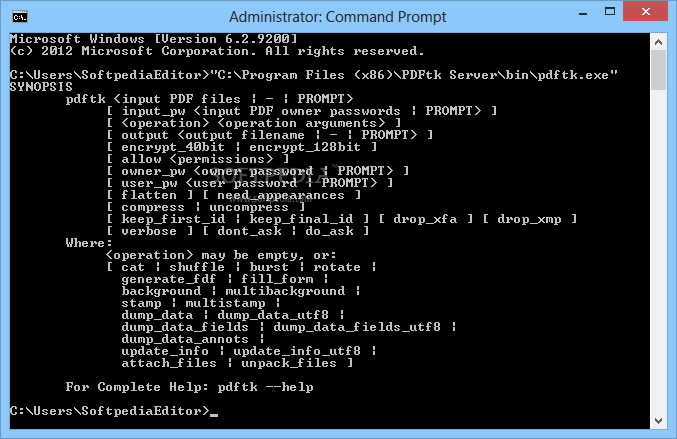
The publisher lists Windows 10 and 11 for this installer. After installation, open Command Prompt and enter pdftk to display its usage information. For example, the publisher documents pdftk in1.pdf in2.pdf cat output out1.pdf to join two input documents into a separate output file. This is a documented example, not a command tested for this entry.
Other operations include background watermarks, foreground stamps, bookmark and metadata updates, attachment extraction and PDF encryption. Decrypting protected input requires its password; PDFtk is not a password-recovery tool. Repair is limited to documents it can recover, not every corrupted PDF.
Choose this edition if you want command-line processing rather than a point-and-click interface. It can be installed and used at no charge under GPL version 2, with third-party license terms. Bundling it with non-GPL-compatible software requires the publisher’s commercial redistribution license.
What it offers
- Merge documents, extract page ranges and split a PDF into individual pages.
- Collate scanned pages and rotate selected pages or whole documents.
- Fill PDF forms using FDF or XFDF data and flatten forms.
- Apply a background watermark or foreground stamp.
- Read and update bookmarks and metadata; attach or extract files.
- Encrypt output PDFs and decrypt password-protected input when the required password is available.
Good to know
- Command-line interface; this standalone Server download does not provide the PDFtk Free or Pro graphical interface.
- Decrypting protected PDFs requires the password; damaged-document repair succeeds only where possible.
- Redistribution with software that is not GPL-compatible requires a separate commercial license.
Product images
Sources
References used for this listing. Retrieval dates do not indicate hands-on testing.
- PDFTK - Download — Windows source listing ↗Retrieved
- PDFtk Server — official product and Windows distribution ↗Retrieved
- PDFtk Server Examples ↗Retrieved
- PDFtk Version History ↗Retrieved
- PDFtk - The PDF Toolkit — edition distinction ↗Retrieved
- PDFtk Server (formerly Pdftk) - Download - Softpedia ↗Retrieved
More in utilities
View category ↗PDFTK Builder 3.10.0
Merge, split, reorder and rotate PDF pages with PDFTK Builder, a free Windows interface for PDFTK that also adds stamps, backgrounds and page numbers.

PDF24 Creator 11.31.1
Create PDFs from printable documents, merge or extract pages, compress files and recognize scanned text with this free offline Windows toolkit.
PDF Arranger 1.14.0
Merge PDFs, extract selected pages and rearrange a document visually with PDF Arranger, a free, open-source application available for Windows.

PDFluent 1.1.2
Edit, annotate, convert and sign PDFs locally with PDFluent, a free Windows desktop editor for personal and business use.

PDFsam Basic 6.0.6
Split, merge, rotate and extract PDF pages offline with PDFsam Basic, a free, open-source desktop tool. This download is the Windows x64 MSI installer.