
Utilities Windows
Pismo File Mount
Mount ZIP archives and ISO images as virtual folders with Pismo File Mount, a free Windows utility with Explorer integration and encrypted Private Folders.
- Operating system
- Windows 7 and later, according to the publisher
- Architecture
- 64-bit x86 and ARM, as listed by the publisher
- Download package
- Windows EXE install package
Publisher-listed platform support, not independently tested. The selected link is the Windows build 24X package; Mac and Linux downloads are separate.
Link checked · Download guidance
What is Pismo File Mount?
Pismo File Mount makes supported container files available through the Windows file system as virtual folders. Use it to browse a ZIP archive or open files inside an ISO image from Explorer and other applications. It also reads Compact ISO (CISO) and Compact File Set (CFS) containers, and can create encrypted, compressed Private Folders for data that should require a password at mount time.
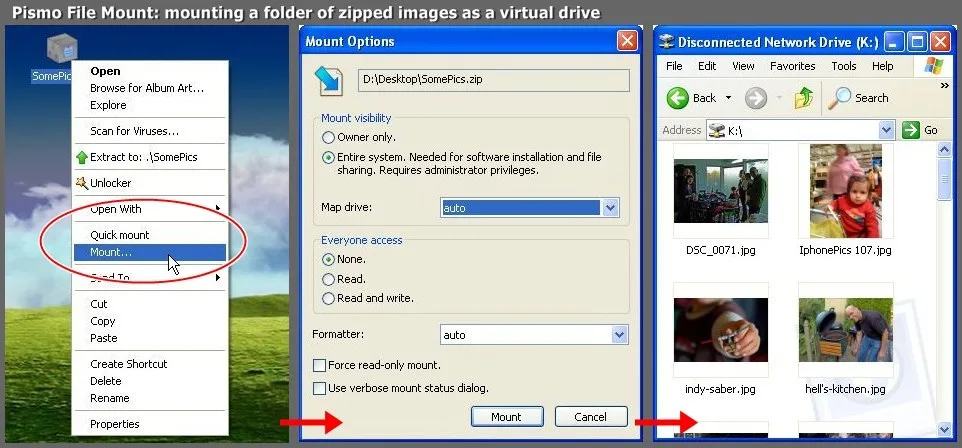
The publisher's Windows quick start offers two routes: right-click a ZIP or ISO and choose PFM Open, or open Pismo File Mount and select File > Mount. When finished, use PFM Eject in Explorer or Unmount in the application's file list. Command-line mount and unmount commands support scripted workflows.
Mounting does not make every container editable. ZIP, ISO, CISO and CFS access is described as read-only; writable encrypted storage uses the separate Private Folder format. The publisher lists Windows 7 and later on 64-bit x86 and ARM, not a current 32-bit Windows package. The screenshot shows historical Windows UI and is not a preview of build 24X.
What it offers
- Mount most ZIP archives and supported ISO, CISO and CFS files as virtual folders.
- Access mounted contents through Explorer and other applications using the file system.
- Use Explorer context menus or the Pismo File Mount interface to mount and eject containers.
- Create encrypted, compressed Private Folder containers that require a password when mounted.
- Automate operations through the command-line interface.
Good to know
- ZIP, ISO, CISO and CFS mounts are read-only; use Private Folders for writable container storage.
- Current publisher platform information lists 64-bit x86 and ARM Windows systems; it does not list 32-bit Windows support.
- Free personal and business use does not grant redistribution rights: the build 24X license prohibits distributing the software.
Product images
Sources
References used for this listing. Retrieval dates do not indicate hands-on testing.
More in utilities
View category ↗

WinCDEmu 4.1
Mount ISO and other optical-disc images as virtual drives in Windows Explorer, or create ISO images, with the free, open-source WinCDEmu utility.
Virtual CD 10.7.0.0
Create and organize CD, DVD and Blu-ray images, mount ISO files and use virtual burners with Virtual CD for Windows. The desktop download is a 30-day trial.
ImDisk Virtual Disk Driver 2.1.2
Mount image files or create memory-backed virtual drives with ImDisk for Windows. Includes a Control Panel applet and command-line tools, but its legacy volume design limits modern Windows integration.
PowerISO 9.5
Create, edit, extract and mount disc images, burn CDs, DVDs and Blu-ray discs, or make bootable USB drives with PowerISO for Windows. The free trial limits image creation and editing to 300 MB.
OSFMount 3.3.1000
Mount disk images as Windows drives or create temporary RAM disks with OSFMount, a free 64-bit utility from PassMark Software.