
Utilities Windows
PloComp
Compare engineering drawings with color overlays and automatic change-area cloud marks. PloComp for Windows also edits, measures and converts supported CAD and image files; a paid license is required after the 30-day trial.
- Operating system
- Windows 7, 8, 10 and 11, as listed by the publisher
- Architecture
- Publisher lists 32-bit and 64-bit Windows on Intel-compatible CPUs
- Download package
- ZIP archive; publisher documents SetupPloCompE.exe inside
Publisher requires 2 GB free memory, 2 GB disk space, a 1024 × 768 or higher display and a default printer driver. DWG support requires ODA File Converter. No individual Windows build numbers are specified.
Link checked · Download guidance
What is PloComp?
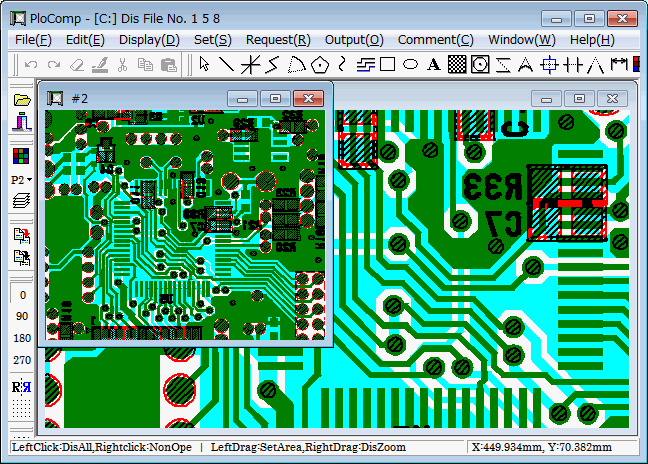
PloComp helps review revisions to engineering drawings, including printed-circuit-board layouts, schematics and mechanical drawings. It can overlay or arrange up to 20 drawings, let you switch individual drawings on or off, and compare two drawings with different colors and automatic cloud marks around changed areas. Supported inputs include HPGL, PDF, DXF, DWG, GERBER, IGES and common raster images. Measurement tools, text search and drawing comments support checking and annotating the result before printing or exporting it.
This is a commercial application with a 30-day full-feature trial, not a permanently free viewer. The publisher says it stops working after the trial unless a license password is entered. DWG import and export require the separate ODA File Converter, and a default printer driver is required, with a high-resolution driver specified for reading PDFs. The linked ZIP is the publisher's Windows distribution: its instructions say to extract it, read Readme.txt and run SetupPloCompE.exe. The package contents and application behavior have not been independently tested here.
What it offers
- Overlay or arrange up to 20 drawings and toggle their visibility individually.
- Compare two drawings using different colors and automatic cloud marks around changed areas.
- Read supported HPGL, PDF, DXF, DWG, GERBER, IGES and raster-image files; DWG requires ODA File Converter.
- Measure coordinates, lengths, areas, line widths and angles, and search for drawing text.
- Add text, shapes and dimensions, then print or export to supported formats such as PDF, DXF and PNG.
Good to know
- The full-feature trial lasts 30 days; the publisher says the program stops working afterward without a license password.
- DWG import and export depend on the separately installed ODA File Converter.
- A printer driver must be installed and set as the default; the publisher specifies a high-resolution driver for PDF input.
Product images
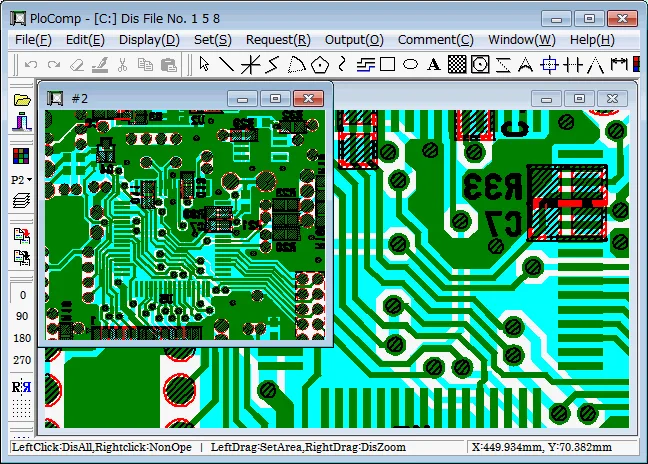
Sources
References used for this listing. Retrieval dates do not indicate hands-on testing.
More in utilities
View category ↗PloView 12.0
View, annotate and convert HPGL, PDF and CAD drawings on Windows with PloView, a commercial drawing viewer with a 30-day trial.
ViewCompanion Pro 17.30
View, annotate, measure and convert PDF, PLT, DWF, CGM and TIFF technical documents with ViewCompanion Pro for Windows. Includes a 30-day evaluation.
DWGSee
View, measure, mark up and print DWG, DXF and DWF drawings on Windows with DWGSee. The linked Pro trial also offers drawing edits and PDF or image export.

Flameshot 14.0.0
Capture a screen region and add arrows, text, highlights or pixelation with Flameshot, a free, open-source screenshot tool for 64-bit Windows.
Moonphase 3.4
Check the Moon's phase, lunar distance and Sun and Moon rise times with Moonphase, a free Windows utility with a calendar and location map.