
Utilities Windows
PloView
View, annotate and convert HPGL, PDF and CAD drawings on Windows with PloView, a commercial drawing viewer with a 30-day trial.
- Operating system
- Windows 7, 8, 10 and 11, as listed by the publisher
- Architecture
- Intel-compatible CPU; publisher lists 32-bit and 64-bit Windows
- Download package
- ZIP containing the English SetupPloViewE.exe installer
Publisher requirements: 2 GB free memory, 2 GB free disk space, display of at least 1024 × 768, and a default printer driver. DWG support needs ODA File Converter.
Link checked · Download guidance
What is PloView?
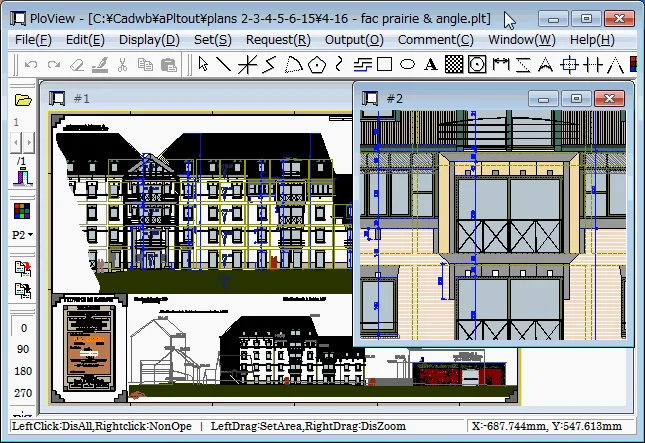
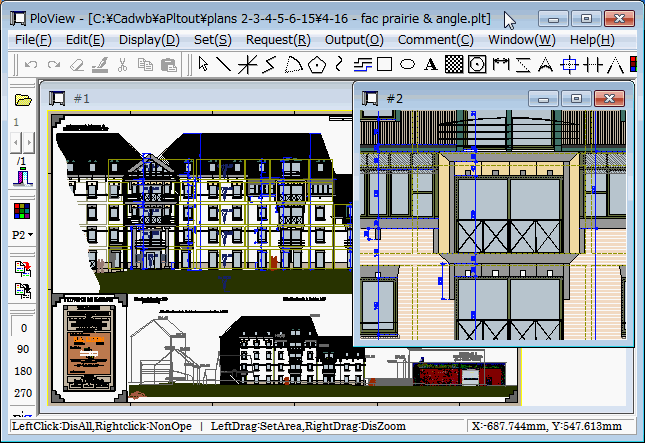
PloView brings technical drawings into one Windows viewer for inspection, measurement and conversion. It opens HP-GL, HP-GL/2, PDF, DXF, GERBER and several image formats, with DWG input and output available through a separately installed ODA File Converter. Use its drawing tools to add text, dimensions and cloud-shaped markup rather than treating it as a read-only previewer.
For a drawing set, PloView can combine several files into a multipage document or split a multipage file into separate pages. Its display controls include zoom, rotation, pen visibility and line-color changes; measurement tools cover length, area and angles. Output options include PDF, DXF, supported raster formats, Windows printers and HPGL plotters.
The download is the publisher's ZIP package, which contains Readme.txt and the English installer SetupPloViewE.exe according to the product page. Read the included installation and license instructions before proceeding. A default printer driver is required, including a high-resolution driver for reading PDF files. The full-feature trial lasts 30 days; the publisher says operation stops afterward unless a licensing password is entered. The trial also includes auto-output functions that are not included in the formal standard PloView license.
What it offers
- Open HPGL, PDF, DXF, GERBER and supported image files; handle DWG through the separately installed ODA File Converter.
- Measure coordinates, lengths, areas and angles, and search drawing text.
- Add drawing elements, text, dimensions and cloud-shaped markup with the comment and editing tools.
- Combine files into a multipage document or split a multipage file into separate pages.
- Convert drawings to supported vector or raster formats, or print through a Windows printer or HPGL plotter.
Good to know
- Commercial software: the full-feature trial lasts 30 days, after which a licensing password is required to continue operation.
- DWG import and export require a separate installation of ODA File Converter.
- A printer driver must be installed and set as default; reading PDF files requires a high-resolution printer driver.
- Auto-output functions available during the trial are not included in the formal standard PloView license.
- For EMF output, the publisher requires Windows display scaling to be set to 100%.
Product images
Sources
References used for this listing. Retrieval dates do not indicate hands-on testing.
More in utilities
View category ↗PloComp 12.0
Compare engineering drawings with color overlays and automatic change-area cloud marks. PloComp for Windows also edits, measures and converts supported CAD and image files; a paid license is required after the 30-day trial.
PloCon 12.0
Batch-print HPGL, PDF, DXF and image drawings on a Windows printer with PloCon, using output lists or a watched folder. Commercial software with a 30-day trial.
ViewCompanion Pro 17.30
View, annotate, measure and convert PDF, PLT, DWF, CGM and TIFF technical documents with ViewCompanion Pro for Windows. Includes a 30-day evaluation.

Draxel 6.1025
Create dimensioned 2D technical drawings in metric or inches with Draxel, a free Windows CAD application with layer folders, underlay tracing and DWG/DXF exchange.

LibreCAD 2.2.1.6
Draw and dimension 2D plans with LibreCAD, a free, open-source CAD application for Windows with layers, snapping and DXF file support.