
Utilities Windows
PloCon
Batch-print HPGL, PDF, DXF and image drawings on a Windows printer with PloCon, using output lists or a watched folder. Commercial software with a 30-day trial.
- Operating system
- Windows 7, 8, 10 and 11, as listed by the publisher
- Architecture
- Publisher lists 32-bit and 64-bit Windows on Intel-compatible PCs
- Download package
- ZIP archive containing SetupPloConE.exe, according to the publisher
Publisher requirements: 2 GB free memory, 2 GB free disk space and 1024 x 768 display or higher. An installed default printer driver is required. DWG input needs ODA File Converter; native ARM support is not established.
Link checked · Download guidance
What is PloCon?
PloCon sends drawing files to a Windows printer without displaying the drawings on screen. It is designed for repeated print jobs: create an output list to process several files continuously, use step output to wait for an instruction between files, or monitor an input folder for incoming drawings. Supported inputs include HP-GL, HP-GL/2, HP RTL, PDF, DXF, DWG, GERBER, NC-Drill, IGES, SXF and common image formats. DWG input requires the separate ODA File Converter.
Printing controls include fit-to-paper scaling, a specified output scale, automatic paper size and orientation selection, pen colors and widths, and multi-page handling. A printer driver must be installed and set as the default; the publisher also requires a high-resolution printer driver for PDF input. Automatic folder output deletes each input file after printing, so use copies rather than the only copy of a drawing.
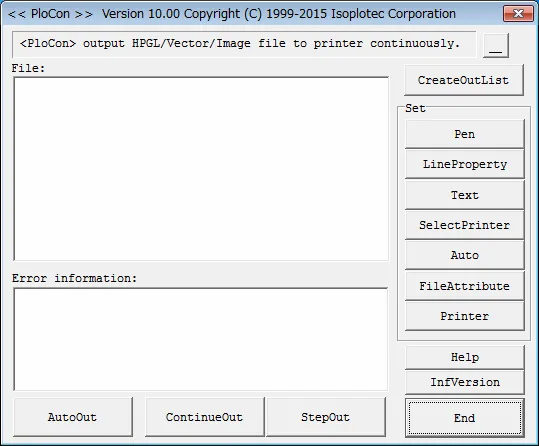
The publisher lists version 12.0 and an October 27, 2026 update. The linked download is the publisher's ZIP package, which its instructions say to extract before reading Readme.txt and running SetupPloConE.exe. All features are available during the 30-day trial; continued use requires a paid license and activation password. The screenshot is the publisher's older version 10.00 interface illustration, not a capture of version 12.0 or evidence of a local software test.
What it offers
- Print supported HPGL, PDF, DXF, DWG, GERBER, IGES, SXF and image files to a Windows printer.
- Process an output list continuously or print one listed file at a time with step output.
- Watch an input folder and automatically print arriving files, deleting the input files after output.
- Fit drawings to paper or specify a scale, with automatic paper size and orientation selection.
- Adjust pen colors, line widths and font settings; handle multi-page input.
- Start automatic or continuous output using documented command-line parameters.
Good to know
- PloCon prints drawings but does not display them for on-screen viewing.
- Automatic folder output deletes input files after printing; retain originals outside the watched folder.
- DWG input requires the separate ODA File Converter. Printing requires an installed default printer driver; PDF input requires a high-resolution driver.
- After the 30-day trial, the program stops working unless a paid-license password is entered.
- The publisher's license-change history states that the software cannot be operated remotely.
Product images
Sources
References used for this listing. Retrieval dates do not indicate hands-on testing.
More in utilities
View category ↗PloView 12.0
View, annotate and convert HPGL, PDF and CAD drawings on Windows with PloView, a commercial drawing viewer with a 30-day trial.
PloComp 12.0
Compare engineering drawings with color overlays and automatic change-area cloud marks. PloComp for Windows also edits, measures and converts supported CAD and image files; a paid license is required after the 30-day trial.
ViewCompanion Pro 17.30
View, annotate, measure and convert PDF, PLT, DWF, CGM and TIFF technical documents with ViewCompanion Pro for Windows. Includes a 30-day evaluation.
DWGSee
View, measure, mark up and print DWG, DXF and DWF drawings on Windows with DWGSee. The linked Pro trial also offers drawing edits and PDF or image export.

Draxel 6.1025
Create dimensioned 2D technical drawings in metric or inches with Draxel, a free Windows CAD application with layer folders, underlay tracing and DWG/DXF exchange.