
Utilities Windows
Product Key Finder
Recover stored software license keys from the Windows registry with Dave Hope's free Product Key Finder, with CSV export and unresolved modern Windows compatibility.
- Operating system
- Windows; publisher download text lists XP / 7 / 8 / 10, with conflicting support table
- Architecture
- Unresolved: download text lists x86/x64; support table rejects 64-bit systems
- Download package
- EXE download
Legacy publisher listing dated April 2015. Windows 8/10 and 64-bit compatibility conflict within the official page; Windows 11 support is not established. No installation or runtime testing performed.
Link checked · Download guidance
What is Product Key Finder?
Product Key Finder retrieves license keys already stored in the Windows registry. Dave Hope's utility is intended for finding existing registration details for supported software, including older Microsoft Windows, Microsoft Office and Adobe Acrobat products. The publisher describes support for more than 200 licenses; this is not a promise that every installed application will be recognized.
The program presents application names alongside their recovered keys. CSV export provides a way to keep the results outside the application, and the publisher documents a /csv command-line option that writes keys to the current directory. Treat an exported license list as sensitive information and store it somewhere access is restricted.
This is a legacy utility with conflicting compatibility information. The publisher labels the download version 2.2.3, April 2015, while Softonic lists 2.3.3. The publisher's download text lists Windows XP, 7, 8 and 10 on x86 and x64, but the same page's comparison table marks 64-bit systems and Windows 8/10 as unsupported. Those contradictions remain unresolved; do not assume support for a current Windows installation. The linked EXE is the publisher's file, checked by HEAD request only, not installed or tested here.
What it offers
- Retrieve existing license-key information from the Windows registry for supported applications.
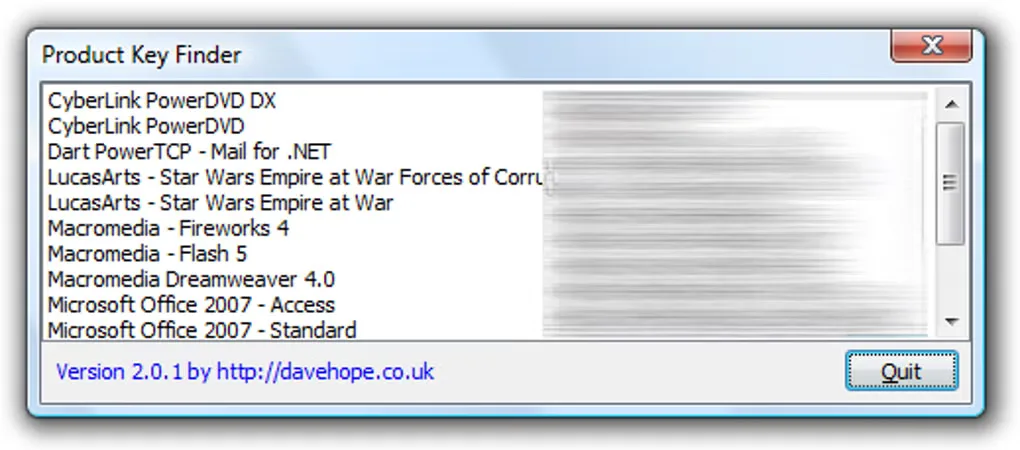
- View application names and recovered keys together in a simple list.
- Export recovered license information as CSV.
- Use the documented /csv command-line option to write a CSV file to the current directory.
Good to know
- Windows and architecture support is contradictory on the publisher's page: its download text lists XP/7/8/10 and x86/x64, but its comparison table rejects 64-bit systems and Windows 8/10. Modern compatibility is not established.
- Publisher version 2.2.3 (April 2015) differs from Softonic's 2.3.3 listing; the linked binary's internal version was not inspected.
- Key recovery is limited to supported software and information present in the registry; the publisher's supported-license count is not universal coverage.
- The publisher specifies CSV-only export and provides the download without warranty or a guarantee of functionality.
- The gallery screenshot shows version 2.0.1, an older interface, not proof of the linked download's version.
Product images
Sources
References used for this listing. Retrieval dates do not indicate hands-on testing.
More in utilities
View category ↗SterJo Key Finder 2.0
Recover stored Windows and supported application product keys, save them to a text file, or scan an attached Windows drive before reinstalling software.
jv16 PowerTools 8.1.0.1564
Find leftover software, clean unwanted data and inspect your Windows PC with jv16 PowerTools, a maintenance suite with a 14-day trial.

ProduKey 1.97
View stored product IDs and license keys for supported Windows, Office and server products with ProduKey, a free portable utility from NirSoft.

O&O RegEditor 16.1.6660
Edit Windows registry keys and values, search with regular expressions, and save frequently used paths with O&O RegEditor, a free portable registry editor.
CommView for WiFi 7.5 Build 977
Capture and inspect wireless packets, access points and channel activity on Windows with CommView for WiFi. A compatible Wi-Fi adapter and its supplied monitoring driver are required.