
Utilities Windows
SterJo Key Finder
Recover stored Windows and supported application product keys, save them to a text file, or scan an attached Windows drive before reinstalling software.
- Operating system
- Windows XP, Vista, 7, 8, 10 and 11
- Architecture
- 32-bit and 64-bit Windows listed by publisher; installer executable architecture not inspected
- Download package
- EXE installer
The selected link delivers keyfinder_setup.exe. The publisher separately offers a portable ZIP; that alternative was not HEAD-verified for this card.
Link checked · Download guidance
What is SterJo Key Finder?
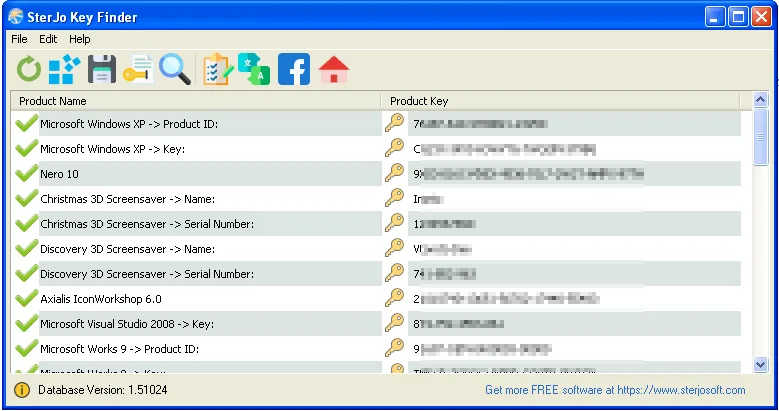
SterJo Key Finder retrieves product and serial keys already stored on a Windows computer. It reads registry locations and known application storage formats, then lists the products and recovered keys in one window. Use its Save option to keep a text backup before reinstalling Windows or supported applications. The publisher also lists BIOS OEM key recovery and offers a portable edition separately from the installer linked here.
For a Windows installation that will not boot, the publisher describes connecting its drive to a working Windows PC, choosing Recover keys from external drive in the File menu, and selecting that drive’s Windows folder. This still requires an accessible drive and recoverable stored license data: the utility does not create new keys or bypass activation. Support varies by application and how it stores its license. In particular, some Office 2013 and 2016 licenses do not expose a complete key. A separate five-character Office helper mentioned by the publisher is not the Key Finder installer linked on this page.
What it offers
- List stored Windows and supported application product keys from registry locations and known storage formats.
- Save recovered product-key details as a plain-text backup.
- Recover keys from an attached Windows drive by selecting its Windows folder from the external-drive recovery command.
- Read supported BIOS OEM keys; a separate portable build is available from the publisher.
Good to know
- Recovers existing stored keys only; it does not generate licenses or bypass software activation.
- Recovery depends on the application’s storage format. Proprietary, encrypted or online-only activation data may not yield a recoverable key.
- Some Office 2013 and 2016 licenses cannot be recovered in full; the publisher’s separate helper may reveal only the last five characters.
- Windows only. The publisher lists supported Windows versions, but the software was not installed or compatibility-tested for this entry.
Product images
Sources
References used for this listing. Retrieval dates do not indicate hands-on testing.