
Utilities Windows
PsTools
Inspect processes, control services and run remote commands with PsTools, Microsoft Sysinternals’ free command-line administration suite for Windows.
- Operating system
- Windows 11 and higher; Windows Server 2019 and higher; Nano Server 2019 and higher
- Architecture
- Not specified on the current suite product page
- Download package
- ZIP archive of command-line utilities
No special installation required. Current suite requirements take precedence over older component documentation; package architectures were not inspected.
Link checked · Download guidance
What is PsTools?
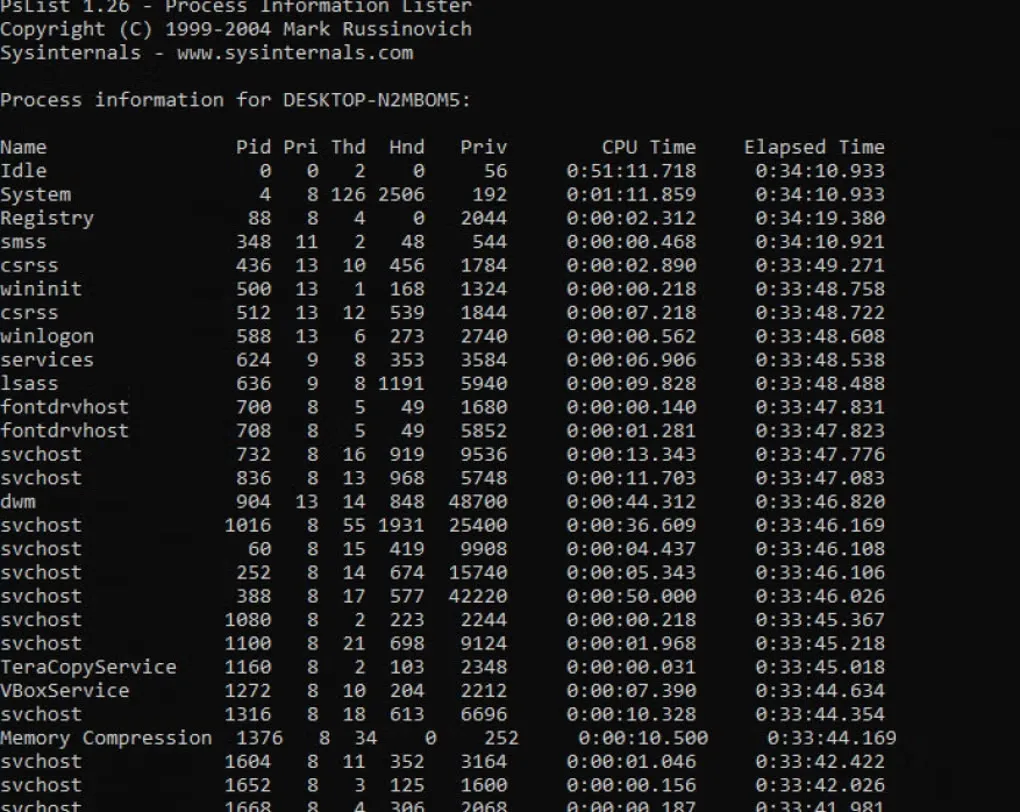
PsTools brings focused command-line utilities together for administering local Windows computers and remote systems. Use PsList to inspect process information, PsInfo to collect system details, PsService to view and control services, or PsExec to launch a process on another computer. Other included tools handle event logs, logged-on users, account passwords and shutdown operations.
The suite suits administrators who want individual commands rather than a graphical management console. Microsoft says no special installation or manually installed remote client software is needed. Extract the ZIP package, run the appropriate utility with its options, and consult the included HTML help or the tool’s -? usage output before performing a change.
No-install does not mean unrestricted access. Remote work still needs appropriate permissions, credentials and network access. Security products can flag the utilities because remote administration capabilities can also be abused. Review those alerts under your organization’s policy rather than assuming they can be ignored. The current suite page lists Windows 11 or later and Windows Server 2019 or later; older component documentation is not a guarantee that this package supports older systems.
What it offers
- Inspect detailed process information with PsList and system information with PsInfo.
- Run processes on remote systems with PsExec.
- View and control Windows services with PsService.
- Read event log records with PsLogList and identify logged-on users with PsLoggedOn.
- Use standalone command-line tools with included HTML help; no special installation is required.
Good to know
- Remote administration depends on suitable privileges, valid credentials and reachable network services.
- Security products may flag PsTools because the same administration capabilities can be misused; acquisition checks are not a malware verdict.
- Command-line syntax and administration knowledge are required. The current suite requirements start at Windows 11 and Windows Server 2019.
Product images
Sources
References used for this listing. Retrieval dates do not indicate hands-on testing.
- PsTools - Sysinternals | Microsoft Learn ↗Retrieved
- PsTools - Download ↗Retrieved
- PsExec - Sysinternals | Microsoft Learn ↗Retrieved
More in utilities
View category ↗
TCPView
See which Windows processes own TCP and UDP endpoints, inspect local and remote addresses, and save connection listings with TCPView from Microsoft Sysinternals.
Autologon 3.10
Configure automatic Windows sign-in with Microsoft Sysinternals Autologon, with controls to enable, disable or skip a single automatic logon.
Contig
Analyze fragmentation and defragment selected files with Contig, a free Windows command-line utility from Microsoft Sysinternals.

ProduKey 1.97
View stored product IDs and license keys for supported Windows, Office and server products with ProduKey, a free portable utility from NirSoft.

Process Monitor 4.12
Trace file system, Registry and process activity on Windows with Process Monitor, Microsoft's free Sysinternals troubleshooting utility.