
Utilities Windows
Puran Defrag
Defragment Windows hard drives with Puran Defrag, a free utility with scheduled maintenance, boot-time processing and file exclusions.
- Operating system
- Windows XP, 2003, Vista, 2008, 7, 8, 10 and 11, as listed by the publisher
- Architecture
- Native 64-bit Windows support listed by publisher
- Download package
- EXE installer (PuranDefragSetup.exe)
The publisher links one standalone setup file. No specific Windows build numbers or ARM support are stated; package contents were not downloaded or inspected.
Link checked · Download guidance
What is Puran Defrag?
Puran Defrag reorganizes fragmented files on Windows hard drives. It offers manual defragmentation, automatic schedules and a boot-time mode for system files that cannot be processed while Windows is running. File and folder selection, exclusions and a command-line interface provide more control over what gets processed.
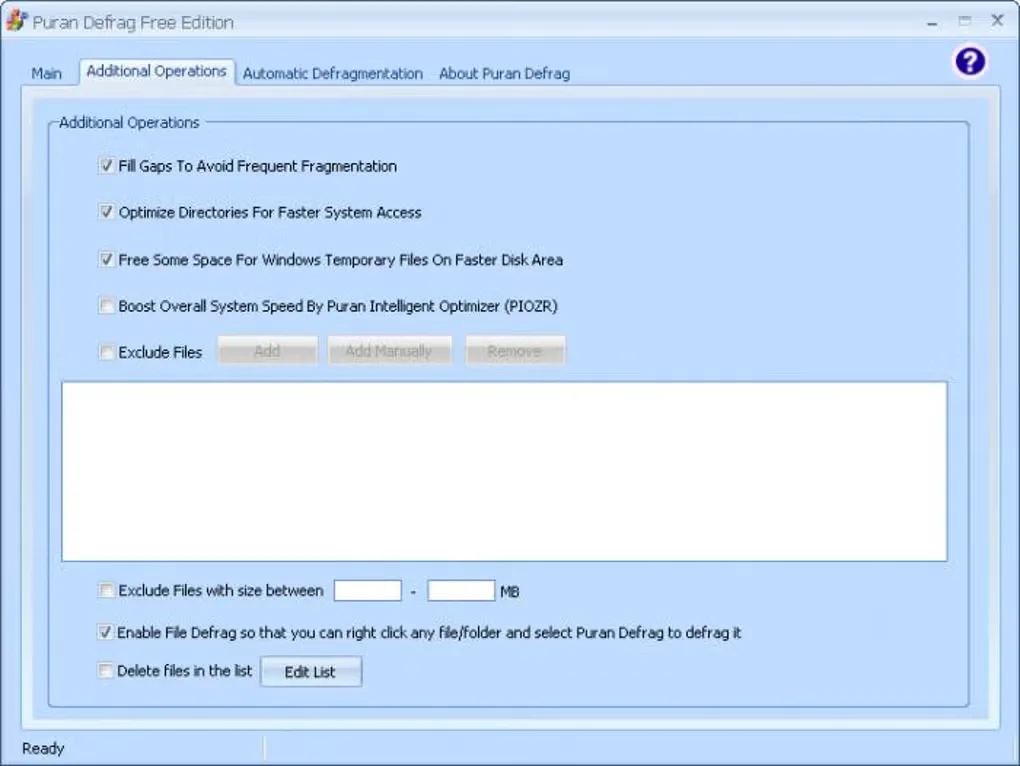
Its additional operations include directory consolidation and the Puran Intelligent Optimizer, which the publisher describes as placing frequently used files in faster disk areas. Directory consolidation is limited to NTFS partitions, while the option to reserve space for Windows temporary files applies only to the Windows volume. These are disk-layout operations, not a measured guarantee of faster performance.
The publisher lists version 7.7.2 with a December 7, 2023 release date and Windows 10/11 support. The screenshot shows the Free Edition's Additional Operations panel; it is a source-provided interface illustration, not evidence of a test run or of the installed version.
What it offers
- Schedule regular defragmentation at startup, at intervals or on selected days.
- Run boot-time defragmentation for system files such as the MFT, registry and pagefile.
- Defragment individual files or folders and exclude files using wildcard rules.
- Use a graphical interface or console command line, with a low-priority processing option.
- Select directory consolidation and Puran Intelligent Optimizer disk-placement options.
Good to know
- Directory consolidation works only on NTFS partitions.
- The option to reserve space for Windows temporary files applies only to the volume containing Windows.
- System files that cannot be processed while Windows is running require the boot-time mode.
Product images
Sources
References used for this listing. Retrieval dates do not indicate hands-on testing.
- Puran Defrag - Automatically Defrag your Hard Disk Drives ↗Retrieved
- Puran Defrag Download ↗Retrieved
- Puran Defrag - Download ↗Retrieved
More in utilities
View category ↗Puran Utilities 3.2.1
Clean unwanted files, manage startup items and run selected maintenance tools from one Windows utility suite. Puran Utilities also includes disk checking and file recovery tools.

Wise Disk Cleaner 11.4.0
Remove temporary files and browser traces with Wise Disk Cleaner, a free Windows cleanup utility with scheduled cleaning and drive optimization tools.

Wise Registry Cleaner 11.3.3
Scan Windows registry entries, review selected cleanup items, and manage registry backups with Wise Registry Cleaner Free. Cleaning other users' registries requires Pro.
Synkron 1.6.2
Synchronize folders on a PC and removable storage with Synkron, a free, open-source utility with scheduling and file exclusions. The Windows release is a legacy build from 2011.


Process Monitor 4.12
Trace file system, Registry and process activity on Windows with Process Monitor, Microsoft's free Sysinternals troubleshooting utility.