
Utilities Windows
qikQR
Create QR codes from text with qikQR, a free, open-source Windows desktop app with image export and appearance settings. Generation uses an online service; the project is archived.
- Operating system
- Windows; supported Windows versions not specified in the inspected release
- Architecture
- 32-bit (ia32) Windows build target declared by the release source
- Download package
- EXE installer; NSIS build target
The v1.0.0 package manifest declares nsis:ia32. The EXE was verified by HEAD only, not downloaded, inspected or installed.
Link checked · Download guidance
What is qikQR?
qikQR is a small desktop QR-code generator by Dipankar Pal. Enter text and press Enter to request a code, preview the result and save the image. Its settings offer output format, square image size, error correction, QR color and background color. It is useful for preparing an individual QR image without working directly with a web API.
This is a desktop interface to an online generator, not an offline encoder. The published source sends the entered text to api.qrserver.com, so an internet connection and that external service are required. Do not enter confidential text when you need local-only processing.
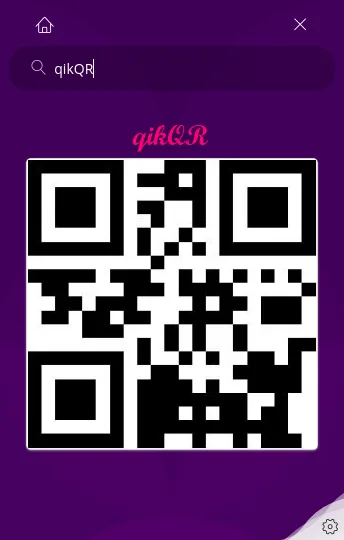
The Windows download belongs to release 1.0.0. GitHub records the release as published on May 8, 2020, while the Windows EXE asset was uploaded on May 26, 2020. The repository is now archived. No current Windows-version support or successful installation is claimed here; the screenshot is the publisher's shared application UI, not a new Windows test.
What it offers
- Enter text and press Enter to generate and preview a QR code through the QRServer service.
- Save the generated image to a qikqr folder in the user's home directory.
- Choose JPG, JPEG, PNG, GIF or SVG in the output-format settings.
- Adjust image size, error correction, QR color and background color.
Good to know
- Generation sends the entered text to api.qrserver.com and requires network access; it is not a local-only or offline workflow.
- The repository is archived and the selected Windows release dates from 2020. Compatibility with current Windows releases has not been established.
Product images
Sources
References used for this listing. Retrieval dates do not indicate hands-on testing.
- qikQR — publisher repository and README ↗Retrieved
- GitHub repository metadata — qikQR archive status ↗Retrieved
- qikQR 1.0.0 — official release and Windows asset metadata ↗Retrieved
- qikQR 1.0.0 package manifest ↗Retrieved
- qikQR 1.0.0 renderer — generation, saving and network dependency ↗Retrieved
- qikQR 1.0.0 settings — formats and appearance controls ↗Retrieved
- qikQR MIT License ↗Retrieved
More in utilities
View category ↗
KeePassXC 2.8.0
Store passwords in an encrypted local database, generate passwords and fill logins with KeePassXC, a free, open-source password manager for Windows.

NormCap 0.6.0
Copy text from a selected screen region with NormCap, a free, open-source OCR tool for Windows that also reads QR codes and barcodes.
QuikGrid 5.4
Turn scattered XYZ data into contour maps and 3D surface views with QuikGrid for Windows. This download is the publisher's legacy 5.4 installer.

CmapTools 7.01.00
Build concept maps that connect ideas, documents and web resources with CmapTools for Windows. Save maps locally or work with others through CmapServers.
Moneydance 2024.4 (build 5253)
Track accounts, budgets, investments and recurring payments with Moneydance for Windows, a commercial personal finance app with a 100-manual-transaction trial.