
Utilities Windows
Sante DICOM Viewer Pro
View and compare DICOM medical images, connect to PACS systems and anonymize studies with Sante DICOM Viewer Pro for Windows. Commercial software with a 90-day demo.
- Operating system
- Windows 11/10; Windows Server 2025/2022/2019/2016
- Architecture
- 64-bit
- Download package
- ZIP setup download
Publisher lists 8 GB RAM minimum, 16 GB for large ultrasound files, and a DirectX 11-compatible GPU with 2 GB memory. Legacy 32-bit release is separate.
Link checked · Download guidance
What is Sante DICOM Viewer Pro?
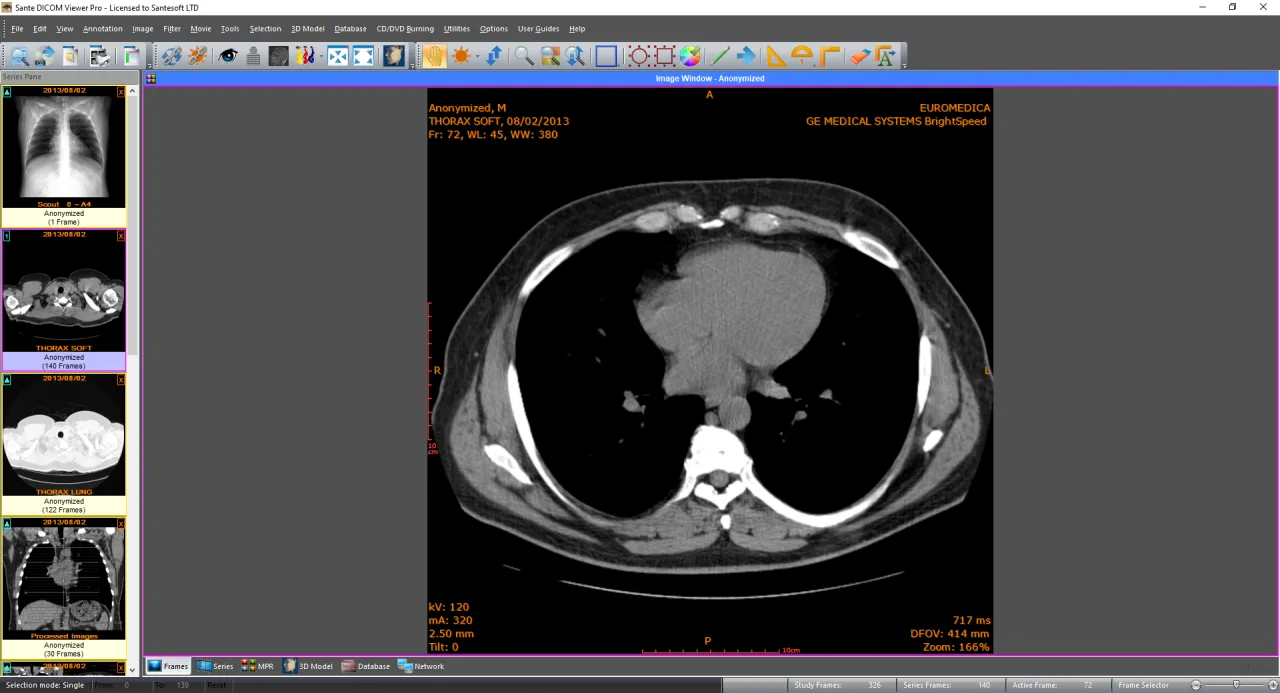
Sante DICOM Viewer Pro is a Windows workstation for viewing, organizing and exchanging DICOM medical images. It combines a 2D/3D viewer with a PACS client, a mini PACS server, anonymization tools and image conversion. Side-by-side study comparison, measurements and orthogonal multi-planar reconstruction support reviewing image series without moving between separate utilities.
For an archive workflow, the publisher lists DICOM network query and transfer services, local study storage, DICOMDIR management and patient CD/DVD creation with a viewer. For preparing files for other uses, it offers batch anonymization, DICOM tag editing and export to formats including JPEG, TIFF, BMP and PNG. These are publisher-documented capabilities, not results of an independent clinical or installation test.
The linked ZIP is the publisher's 64-bit Windows package for version 14.5.0. It runs as a 90-day demo without a license key; a purchased perpetual license unlocks the program through Help > Registration. This is not freeware. The current package is not the legacy 32-bit edition, and the publisher's minimum requirements include a DirectX 11-compatible graphics card with 2 GB of memory and at least 8 GB of system RAM.
What it offers
- View DICOM images in 2D and create 3D views using isosurface, volume rendering or maximum intensity projection.
- Compare studies side by side and use distance, angle, area and volume measurement tools.
- Use orthogonal multi-planar reconstruction (MPR) to review image data in additional planes.
- Query and transfer studies through a PACS client with C-FIND, C-MOVE, C-STORE, C-GET and C-ECHO support; TLS connections are supported.
- Store studies locally using the mini PACS server and manage DICOMDIR files.
- Batch anonymize studies, edit DICOM files and export images to JPEG, TIFF, BMP or PNG.
- Create patient CD/DVD discs with an included viewer.
Good to know
- Commercial software: the unregistered demo lasts 90 days; continued licensed use requires a purchased license key.
- The selected version is 64-bit only. The publisher lists version 11.9.4 separately as the last release supporting 32-bit systems.
- Minimum hardware includes an Intel Core i3 or AMD Ryzen 3, 8 GB RAM, a DirectX 11-compatible GPU with 2 GB memory and a 1366×768 display; the publisher specifies 16 GB RAM for large ultrasound files.
Product images
Sources
References used for this listing. Retrieval dates do not indicate hands-on testing.
- Sante DICOM Viewer Pro | Santesoft LTD ↗Retrieved
- Sante DICOM Viewer Pro | Download ↗Retrieved
More in utilities
View category ↗
Weasis 4.7.3
View DICOM medical images on Windows with Weasis, a free, open-source viewer with multiplanar reconstruction and PACS connectivity.
Charrua WorkStation
View and manage DICOM studies on Windows with Charrua WorkStation, including printing, reporting and study-disc creation. A 15-day trial is available; it is not certified for primary diagnosis.
ViewCompanion Pro 17.30
View, annotate, measure and convert PDF, PLT, DWF, CGM and TIFF technical documents with ViewCompanion Pro for Windows. Includes a 30-day evaluation.


Beyond Compare 5.2.7 (build 32913)
Compare files and folders, inspect text differences and synchronize directories with Beyond Compare for Windows. Free evaluation; continued use requires a paid license.
DWGSee
View, measure, mark up and print DWG, DXF and DWF drawings on Windows with DWGSee. The linked Pro trial also offers drawing edits and PDF or image export.