
Utilities Windows
Scanitto Pro
Scan paper documents through a TWAIN scanner, recognize text and save searchable multi-page PDFs with Scanitto Pro for Windows. The commercial application offers a 30-day trial.
- Operating system
- Windows XP SP3, Vista, 7, 8, 10; Windows Server 2003, 2008, 2012
- Architecture
- Publisher lists 32-bit and 64-bit operating systems; installer architecture is not specified
- Download package
- EXE installer
TWAIN scanner required. Publisher minimums include 512 MB RAM and 25 MB free disk space. Windows 11 is not listed; no local installation or scanner test was performed.
Link checked · Download guidance
What is Scanitto Pro?
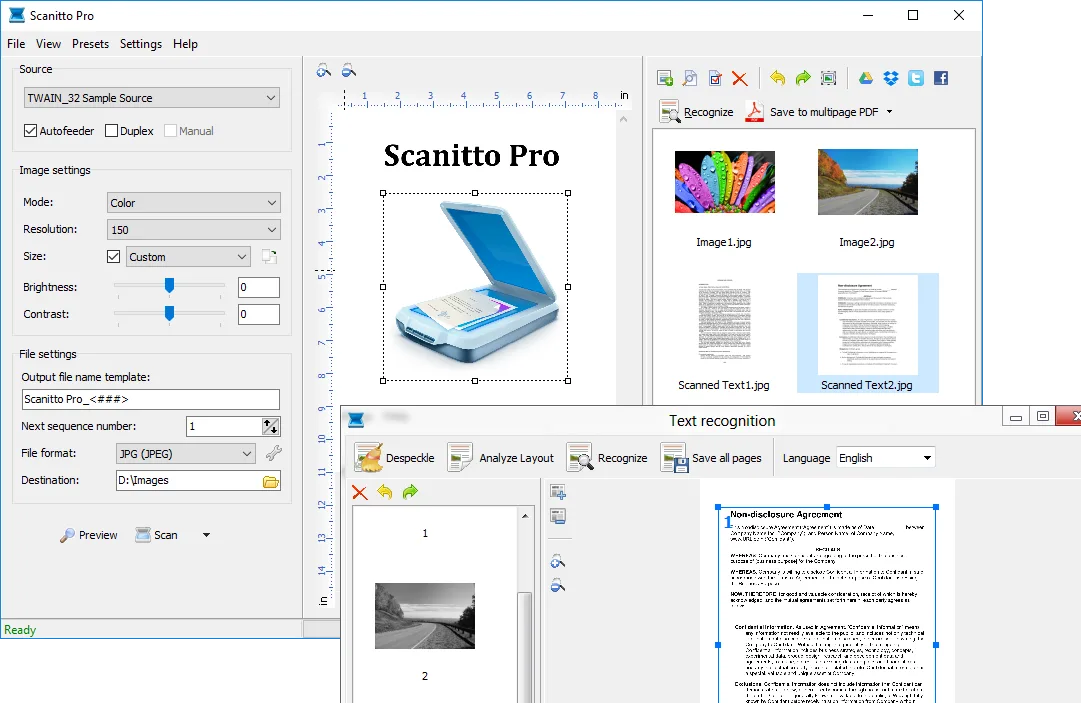
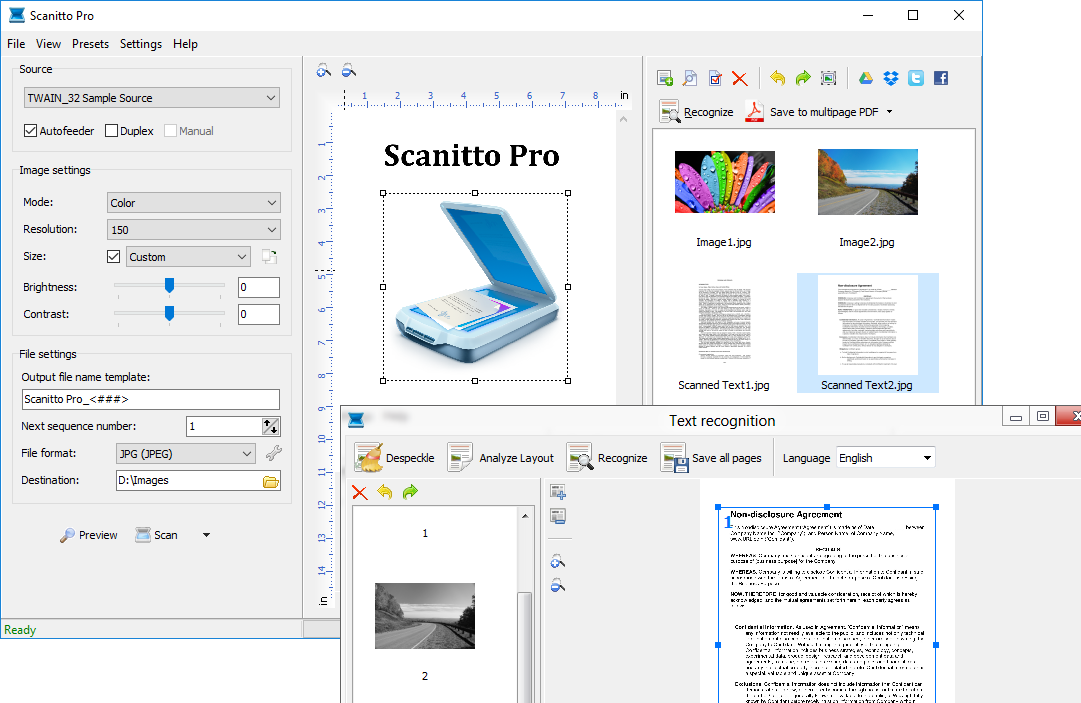
Scanitto Pro brings scanning, page organization and optical character recognition into one Windows application. It connects through TWAIN scanner drivers and saves scans as PDF, BMP, JPG, TIFF, JP2 or PNG. For a document with several pages, it can assemble a multi-page PDF or TIFF rather than leave each scan as a separate file. OCR adds a way to turn scanned text into editable or searchable electronic documents.
The scanning controls let you select color, grayscale or black-and-white output, set resolution and choose a region of the page. The publisher also documents automatic border cropping, document-feeder controls and duplex scanning controls. Those controls do not establish that every scanner supports those functions: a TWAIN scanner is a stated system requirement. Pages can be reordered before PDF output, while the OCR tools include deskewing, despeckling and page-layout analysis. A direct-copy function sends an image to a printer.
This is not a permanently free scanner utility. The unregistered version is fully functional for 30 days; registration removes that time limit. The publisher's download page identifies version 3.19, dated December 13, 2017, and lists Windows releases through Windows 10 and Windows Server 2012. It does not establish Windows 11 compatibility. The linked EXE has been checked with a body-free HEAD request; the application has not been installed or tested here.
What it offers
- Acquire scans through TWAIN drivers with configurable color mode, resolution and scan region.
- Save PDF, BMP, JPG, TIFF, JP2 and PNG files, including multi-page PDF and TIFF documents.
- Recognize text and create searchable PDFs; the publisher lists English, Italian, Russian, German, French and Spanish OCR languages.
- Reorder scanned pages and prepare recognition with deskewing, despeckling and page-layout analysis.
- Use document-feeder and duplex controls, automatic border cropping or direct copying to a printer.
Good to know
- The fully functional unregistered trial lasts 30 days; registration is required to remove the time limit.
- A TWAIN scanner is required. Document-feeder and duplex controls should not be treated as a guarantee of those capabilities on every device.
- The publisher lists version 3.19 from December 13, 2017, with Windows support through Windows 10 and Server 2012; Windows 11 support is not confirmed by these sources.
Product images
Sources
References used for this listing. Retrieval dates do not indicate hands-on testing.
- Scanitto Pro - Scanner software for Windows ↗Retrieved
- Scanitto Pro - Features ↗Retrieved
- Scanitto Pro - Download ↗Retrieved
- End-User License Agreement ↗Retrieved
More in utilities
View category ↗
Ashampoo PDF Pro 5.0.0
Edit, merge and convert PDFs with Ashampoo PDF Pro for Windows, including OCR for scanned documents and a virtual PDF printer. Paid software with a 30-day trial.
FM JPG To PDF Converter Pro 2.03
Combine JPG, PNG and other bitmap images into single-page or multi-page PDFs on Windows, with batch processing, layout previews and page-margin controls.
PDF Combine
Merge PDF files offline on Windows, arrange their order and add bookmarks, a table of contents or page numbers with CoolUtils PDF Combine.
PDF Anti-Copy 2.6
Reprocess selected PDF pages to restrict text copying and conversion with PDF Anti-Copy for Windows. A paid Pro upgrade adds watermark-free output and commercial use.
OVITO Basic 3.17.1
Inspect particle simulations and molecular structures in 3D with OVITO Basic, a free Windows application for visualization and pipeline-based data analysis.