
Utilities Windows
securefs
Encrypt a folder and work with its decrypted contents through a mounted drive using securefs, an open-source command-line filesystem for Windows.
- Operating system
- Windows; Softonic lists Windows 11
- Architecture
- x64 (amd64)
- Download package
- ZIP archive
Requires WinFsp and Visual C++ redistributable separately. Exact minimum Windows build is not established by the consulted publisher documentation.
Link checked · Download guidance
What is securefs?
securefs keeps an encrypted backing directory while exposing its contents through a mounted filesystem. Files written through the mount are encrypted, and files read there are decrypted automatically. This suits a folder of documents you want to work with normally while keeping the backing files encrypted, including when those files are synchronized to cloud storage. It is a command-line tool rather than a standalone graphical vault manager.
Create an encrypted directory with the create command, then use mount to make it accessible at a mount point or Windows drive letter. Passwords and key files are supported. The default lite format encrypts names and contents separately but leaves the directory structure visible; full format hides more of the hierarchy at a cost to performance and synchronization convenience. Optional random padding obscures file sizes, with a documented performance cost.
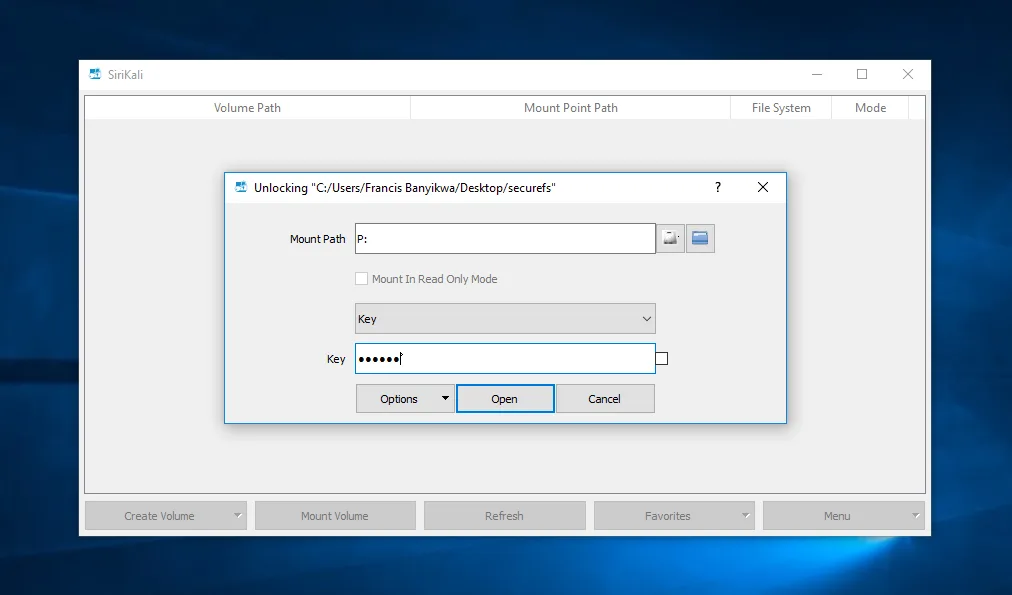
Windows requires WinFsp and the Visual C++ redistributable to be installed separately. The linked package is the publisher’s Windows amd64 ZIP for version 2.0.0, not a bundled dependency installer. The screenshot shows SiriKali, a separately installed graphical frontend, opening a securefs folder on Windows; it does not show a GUI included in this ZIP. The securefs author links SiriKali for information but explicitly says its code has not been vetted by them.
Encryption is not a promise that all local traces disappear: the publisher warns that swap and hibernation files may contain plaintext or keys from memory. Full format also has weaker directory-structure guarantees after abnormal termination. These trade-offs matter when choosing the format and the machine on which to mount sensitive files.
What it offers
- Read and write files through a mounted filesystem with transparent authenticated encryption of the backing contents.
- Create repositories protected by a password, a key file, or both.
- Choose the default lite format or full format according to directory-privacy and synchronization needs.
- Optionally pad encrypted files to obscure their sizes.
- Use version 2.0.0 commands to unmount a filesystem, check a mount point, or automatically unmount after a configured idle period.
Good to know
- Windows requires separately installed WinFsp and Visual C++ runtime components; the download is a ZIP package.
- The default lite format leaves the directory structure visible; full format trades performance and synchronization convenience for more hierarchy privacy.
- Swap and hibernation files can expose plaintext or keys held in memory unless separately protected.
- SiriKali is an optional third-party frontend, not included in the linked securefs package or vetted by the securefs author.
Product images
Sources
References used for this listing. Retrieval dates do not indicate hands-on testing.
- securefs for Windows — Softonic product page ↗Retrieved
- securefs — publisher README ↗Retrieved
- securefs — complete command-line options ↗Retrieved
- securefs — MIT license ↗Retrieved
- securefs v2.0.0 — publisher release notes ↗Retrieved
- securefs v2.0.0 — official release assets ↗Retrieved
- SiriKali — official Windows backend list and screenshots ↗Retrieved
More in utilities
View category ↗
VeraCrypt 1.26.30
Create encrypted file containers or encrypt non-system partitions and USB storage with VeraCrypt. This Windows download is the portable EXE and requires administrator rights.


Rclone 1.75.2
Copy, sync and move files between Windows and cloud storage with Rclone, a free command-line tool with an optional browser-based interface.
MadPassExt 1.00
Extract your Microsoft account's DPAPI password from its Windows cache with MadPassExt, a free portable utility that requires your known account password.
Autologon 3.10
Configure automatic Windows sign-in with Microsoft Sysinternals Autologon, with controls to enable, disable or skip a single automatic logon.
PDFtk 2.02
Merge, split, rotate and process PDF documents from the Windows command prompt with PDFtk Server, the original command-line PDF toolkit.