
Utilities Windows
ShadowExplorer
Browse existing Windows shadow copies and export earlier versions of files or folders with ShadowExplorer, a free recovery utility that complements regular backups.
Version 0.9 · Direct publisher file
Link checked · Download guidance
What is ShadowExplorer?
ShadowExplorer gives you a file-browser interface to the point-in-time copies held by Windows Volume Shadow Copy Service. It is useful when a file has been changed or deleted and an earlier copy is still available: select a snapshot, browse its folders and export the version you need. The publisher lists Windows 11, 10, 8, 7 and Vista.
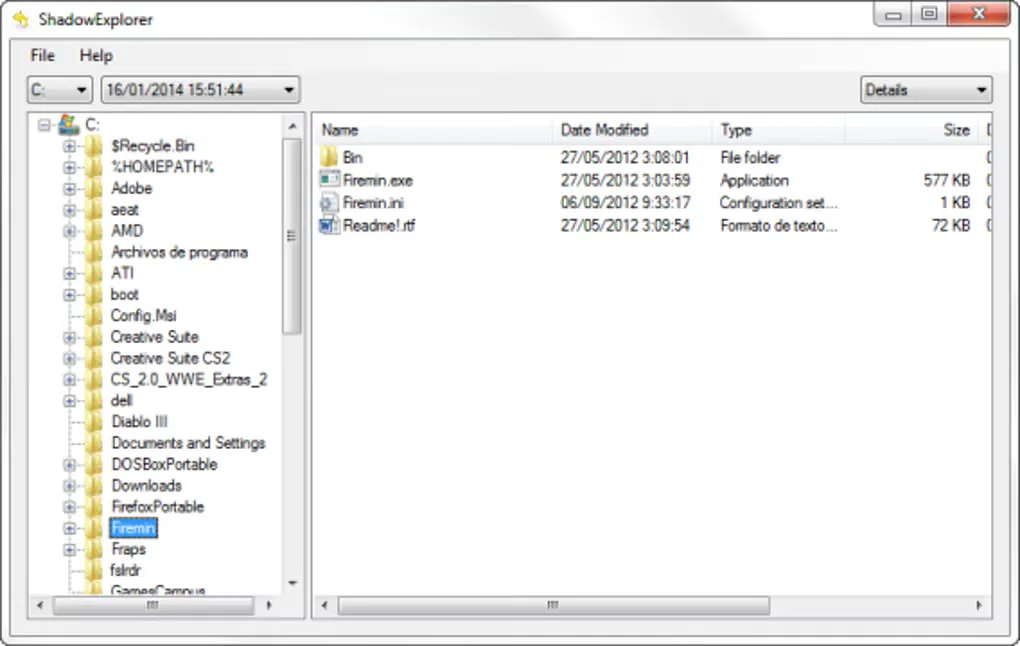
The publisher's manual describes choosing an available shadow copy from a drop-down list, right-clicking a file or folder and selecting Export, then choosing a destination folder. Existing destination files can trigger an overwrite prompt. Exporting into a separate folder is a practical way to keep the recovered version apart from your current work.
Recovery depends on an existing shadow copy containing the data you want. ShadowExplorer is not a substitute for a separate backup: the publisher warns that shadow copies are stored on the original disk, so disk failure can destroy both the current files and their snapshots. The official download catalog offers version 0.9 as an EXE installer and a separate portable ZIP; this card links to the installer. Compatibility is publisher-listed, not independently tested here.
What it offers
- List available point-in-time shadow copies.
- Browse a shadow copy through a folder tree and file list.
- Export earlier versions of individual files or whole folders to a chosen destination.
- Confirm before overwriting existing destination files, with a setting to reset suppressed prompts.
Good to know
- Recovery requires an available shadow copy containing the wanted files; the utility cannot retrieve a version absent from those copies.
- Shadow copies on the original disk do not protect against disk failure and cannot replace separate backups.
- The publisher lists Windows 11, 10, 8, 7 and Vista, but exact build and processor-architecture support are not established by the sources used here.
Product images
Sources
References used for this listing. Retrieval dates do not indicate hands-on testing.
- ShadowExplorer.com - About ↗Retrieved
- ShadowExplorer.com - Downloads ↗Retrieved
- ShadowExplorer.com - Manual ↗Retrieved
- ShadowExplorer - Download ↗Retrieved
More in utilities
View category ↗Remo Repair RAR 1.0.0.12
Attempt to repair damaged RAR archives on Windows and preview their contents before buying. The free demo cannot save repaired files.
CheckDrive 2026.7
Check HDD and SSD health, inspect S.M.A.R.T. information and find file-system errors with CheckDrive for Windows. The free edition includes ads; background monitoring requires Plus.

EditPad Lite 8.6.1
Edit plain text in tabs with Unicode support, multi-line search and replace, and undo after saving. EditPad Lite for Windows is free for personal, non-commercial use.

Ashampoo WinOptimizer Free
Clear browsing traces, inspect disk usage and manage Windows settings with Ashampoo WinOptimizer Free, a maintenance suite that requires administrator rights and online activation.

CSV Editor Pro 34.0
Edit, filter and clean CSV tables on Windows with CSV Editor Pro. Work across tabbed files, find duplicate rows and use regular-expression search in a paid application with a 21-day trial.