
Utilities Windows
SpectraVue
Analyze radio signals with RFSPACE receivers, or inspect soundcard and wave file input, using SpectraVue for Windows.
- Operating system
- Windows; current-build compatibility not verified
- Architecture
- x86 according to Wingetly package metadata
- Download package
- EXE installer
Receiver hardware and drivers must match the intended input. Third-party Windows 11 and winget listings are not proof of publisher-tested compatibility.
Link checked · Download guidance
What is SpectraVue?
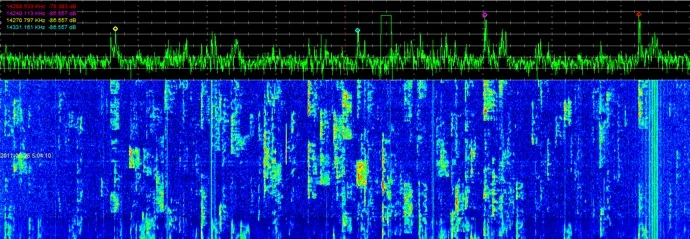
SpectraVue is a spectral analysis and receiver program for Windows. It is associated with RFSPACE SDR-IQ, SDR-14, SDR-IP and NetSDR receivers, but also accepts soundcard and wave file input for analysis without those receiver inputs. The publisher-provided view shows a frequency spectrum above a waterfall, allowing signal peaks and changes over time to be examined together.
Choose it for an existing RFSPACE receiver setup or for examining supported recorded input, rather than assuming it works with every SDR device. RFSPACE lists the associated receivers as legacy products, and the sources checked do not establish compatibility with current Windows builds or arbitrary third-party receivers.
The publisher lists version 3.44 and warns about upgrading over an older installation: remove SpectraVue.ini or uninstall the older version first. Deleting that file discards the existing configuration, so retain a backup before following the publisher's instruction. This entry links to the publisher-hosted EXE checked with a HEAD request; the installer was not downloaded or run.
What it offers
- Analyze receiver input associated with RFSPACE SDR-IQ, SDR-14, SDR-IP and NetSDR hardware.
- Use soundcard or wave file input as alternatives to receiver input.
- View a frequency spectrum and waterfall, as shown in the publisher screenshot.
- Loop wave file input using the continuous loop option described in RFSPACE support notes.
Good to know
- Current Windows-build compatibility and support for arbitrary third-party SDR devices were not verified; RFSPACE lists the associated receiver hardware as legacy.
- Installing over an older SpectraVue version may fail unless SpectraVue.ini is removed or the older version is uninstalled, according to RFSPACE. Removing the configuration file resets saved settings.
Product images
Sources
References used for this listing. Retrieval dates do not indicate hands-on testing.
- SpectraVue™ Software ↗Retrieved
- SpectraVue - Download ↗Retrieved
- Install SpectraVue 3.44 with winget | RFSpace | Wingetly ↗Retrieved
- RFSPACE Support ↗Retrieved
More in utilities
View category ↗HDSDR 2.81a
Tune and analyze radio signals with HDSDR, a free Windows SDR application with spectrum and waterfall displays, audio filtering, and scheduled WAV recording.
CubicSDR 0.2.5
Explore radio signals with spectrum and waterfall displays, tune multiple channels and listen through a supported SDR receiver. This download is the older Windows x64 0.2.5 build.

JTDX 2.2.159
Decode weak amateur-radio signals and work digital modes including FT8, FT4 and JT65 with JTDX, a free, open-source Windows application derived from WSJT-X.
Universal Radio Hacker 2.10.0
Inspect radio signals, decode messages and map wireless protocol fields with Universal Radio Hacker, an open-source Windows tool whose original repository is archived.
Thetis HL2 2.10.3.15
Control a Hermes-Lite 2 SDR transceiver from Windows with mi0bot’s hardware-specific Thetis fork, including radio setup, spectrum displays and virtual audio integration.