
Utilities Windows
Start11
Replace and personalize the Windows 10 or 11 Start menu with classic layouts, custom sections, taskbar controls and local search options.
- Operating system
- Windows 10 and Windows 11
- Architecture
- x86 installer entry in the Microsoft WinGet manifest
- Download package
- EXE installer
Publisher also lists ARM support, but this receipt checks only the exact linked EXE endpoint. Architecture is manifest metadata, not an installed compatibility test.
Link checked · Download guidance
What is Start11?
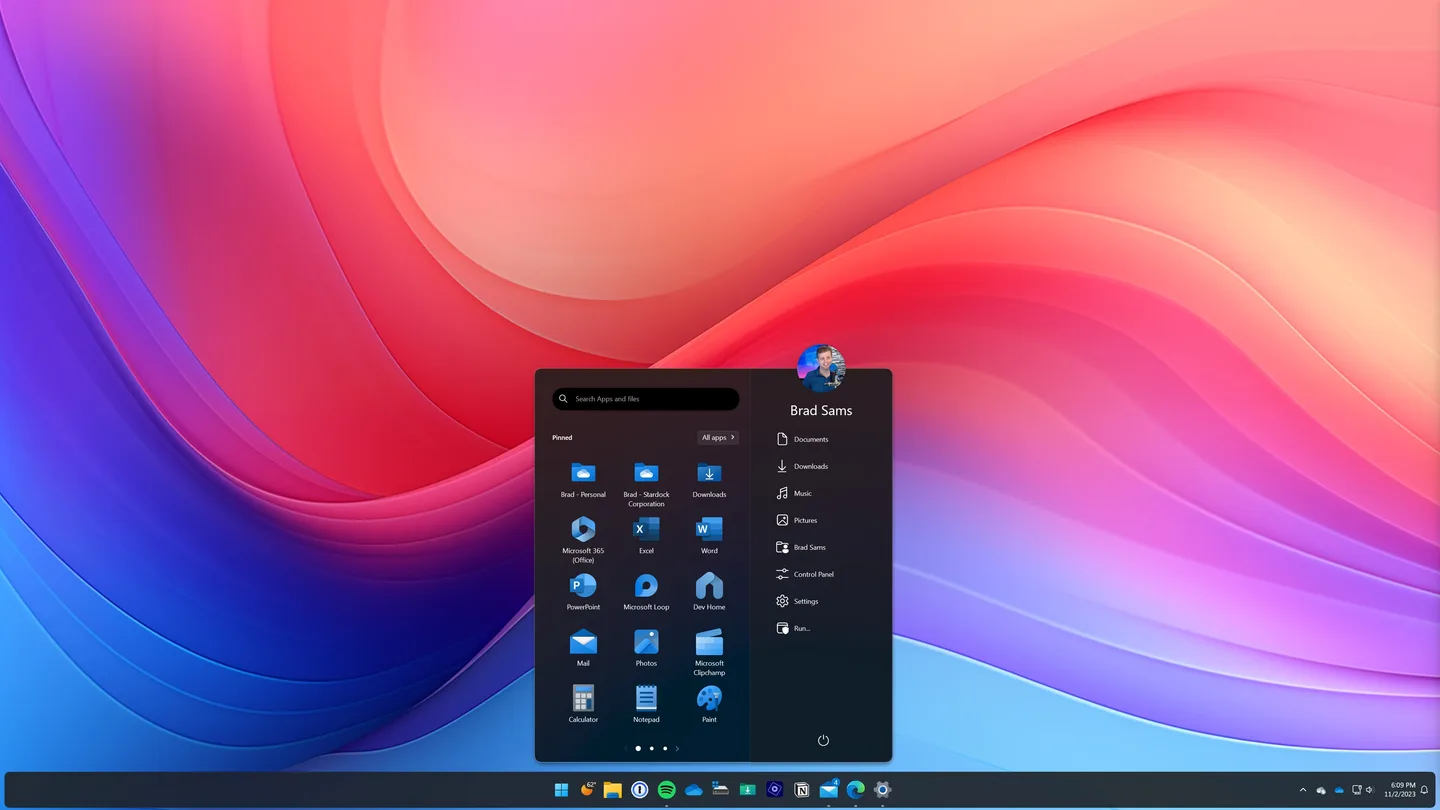
Start11 changes the Windows Start menu and taskbar rather than replacing the operating system. Choose a familiar Windows 7, Windows 10 or Windows 11-style menu, or use one of Stardock’s alternative designs. Adjust sections, tabs, colors, transparency, icon sizes and alignment to put the apps and folders you use within reach.
Its taskbar options include pinning files and folders, opening a folder menu, restoring a taskbar context menu and moving the taskbar to the top or side of the screen. Search can integrate with Everything, while indexing open browser tabs depends on Microsoft Edge. Those integrations are distinct from basic menu customization.
Start11 is paid software with a free trial, not freeware. Stardock offers annual and permanent license options; the permanent option shown on the product page includes updates for Start11 v2. The linked Windows EXE is the endpoint listed in the Microsoft WinGet manifest for file version 2.8.1.0. Its availability and binary MIME were checked using HEAD only; the installer was not downloaded or run.
What it offers
- Choose classic Windows-style Start menus or alternative layouts, including the Pro design shown in the publisher screenshot.
- Add or remove menu sections and tabs; adjust colors, transparency, spacing and icon size.
- Pin files and folders to the taskbar or access folder contents through a folder menu.
- Customize the taskbar position and appearance, including rounded and floating styles.
- Integrate search with Everything and include open Microsoft Edge tabs when using Edge.
Good to know
- Paid license required beyond the trial; the permanent license option shown covers Start11 v2 updates, not every future major version.
- Everything integration depends on the Everything search engine; open-tab search is tied to Microsoft Edge.
- In the Windows-controlled taskbar-position mode documented for Windows 11 26H2, one OS position setting applies to all monitors; separate monitor positions require Start11 options.
Product images
Sources
References used for this listing. Retrieval dates do not indicate hands-on testing.
More in utilities
View category ↗addLEDs 2.0.0.6
See and toggle Caps Lock, Num Lock and Scroll Lock with on-screen indicators. addLEDs offers several display modes for Windows 10 and 11, with a 30-day full-function trial.
StartAllBack 3.9.28
Restore a classic Start menu and customize the taskbar, File Explorer and context menus on Windows 11 with StartAllBack.
Winstep Xtreme 26.9
Organize a Windows desktop with configurable docks, tabbed shelves, menus and live widgets in Winstep Xtreme, a paid suite with a 30-day trial.

Rainmeter 4.5.28
Add movable desktop skins for hardware meters, clocks and other widgets with Rainmeter, a free, open-source Windows customization tool.
Windhawk 1.7.3
Customize Windows programs with Windhawk mods for taskbar behavior, Start menu styling and other targeted changes, managed from one interface.