
Utilities Windows
SysInfo PDF Image Extractor
Extract embedded images from one or several PDFs on Windows with SysInfo PDF Image Extractor. The demo previews images only; saving requires the paid version.
- Operating system
- Publisher lists Windows 11, 10, 8.1, 8, 7 and Windows Server 2008/2012
- Architecture
- Publisher lists 32-bit and 64-bit Windows; installer architecture not independently verified
- Download package
- EXE demo installer
Publisher lists 8 GB RAM, with 16 GB recommended. Its stated 512 GB disk-space minimum is unusual and unconfirmed. Compatibility was not runtime-tested.
Link checked · Download guidance
What is SysInfo PDF Image Extractor?
SysInfo PDF Image Extractor separates images, photographs and graphics from PDF documents so they can be stored as individual image files. It is aimed at reusing illustrations from reports, brochures or portfolios rather than converting whole PDF pages into another document format. The publisher describes support for single-file and batch extraction without requiring Adobe Acrobat.
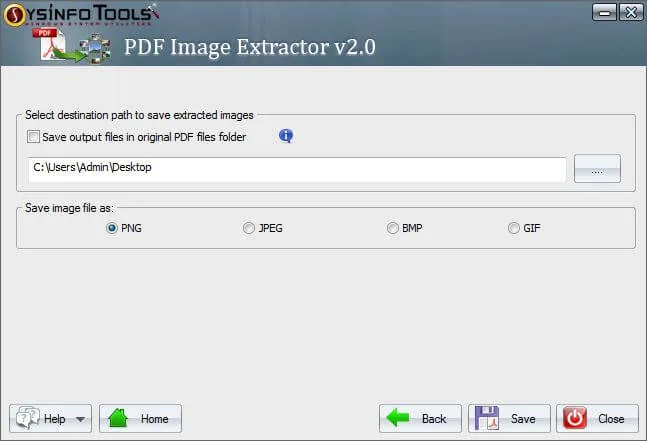
The documented workflow starts by selecting one or more PDFs. Single-file mode provides an image preview and image count; that preview is not available when several PDFs are selected. For saving in the licensed version, choose a destination folder and PNG, JPEG, BMP or GIF output. The screenshot shows these destination and format controls in the publisher's v2.0 interface.
The linked Windows EXE is a demo, not a free full extractor: it can preview images but cannot save them. The publisher also advertises extraction from damaged PDFs, but recovery results have not been independently tested here. Its requirements table lists Windows 11, 10, 8.1, 8 and 7, plus Windows Server 2008/2012. The same table states a 512 GB minimum disk-space requirement; that unusually high figure is unconfirmed rather than silently corrected.
What it offers
- Select a single PDF or multiple PDFs for image extraction.
- Preview extracted images and their count when processing one PDF.
- Choose PNG, JPEG, BMP or GIF output in the licensed version.
- Choose a destination folder for saved images.
- Use the standalone Windows application without Adobe Acrobat, according to the publisher.
Good to know
- The demo only previews images and cannot save them; saving requires a paid license.
- Image preview is available for a single PDF, not a batch of PDFs.
- The publisher's damaged-PDF recovery claims have not been independently tested.
- The publisher lists a 512 GB minimum disk-space requirement; its accuracy has not been confirmed.
Product images
Sources
References used for this listing. Retrieval dates do not indicate hands-on testing.
More in utilities
View category ↗SysInfo Gmail Attachment Downloader
Save attachments from selected Gmail emails to a local folder using the Windows SysInfo Gmail Backup workflow. The demo covers the first 50 emails per folder.
SysInfo Email Migration Tool 26.8
Migrate mailboxes between supported services or export email to local files with SysInfo Email Migration Tool for Windows, a commercial utility with a limited demo.
SysTools MBOX Email Address Extractor 3.0
Extract email addresses from MBOX, MBX and MBS archives on Windows, filter by date or domain, and export a deduplicated address list. The free demo limits the number of addresses extracted per file.

Game Extractor 3.16.0008
Open supported game archives and extract their files with Game Extractor Basic for Windows. Previewing assets, conversion and archive editing require the paid Full edition.
QNAP QuDedup Extract Tool 1.1.7.25269
Restore files and folders from QNAP HBS .qdff backups on Windows. Preview backup contents and select a saved version before extracting the data you need.