
Utilities Windows
Taskbar Monitor
Display CPU, memory, disk and network graphs on the Windows taskbar, with configurable history and update intervals. Windows 11 support is experimental.
- Operating system
- Windows; Windows 11 support is experimental
- Architecture
- Not specified in the inspected publisher instructions
- Download package
- EXE installer
Requires .NET Framework 4.7.2 and administrator rights. Publisher says the runtime is included with Windows 10 version 1803 and later; that is not a complete supported-build list.
Link checked · Download guidance
What is Taskbar Monitor?
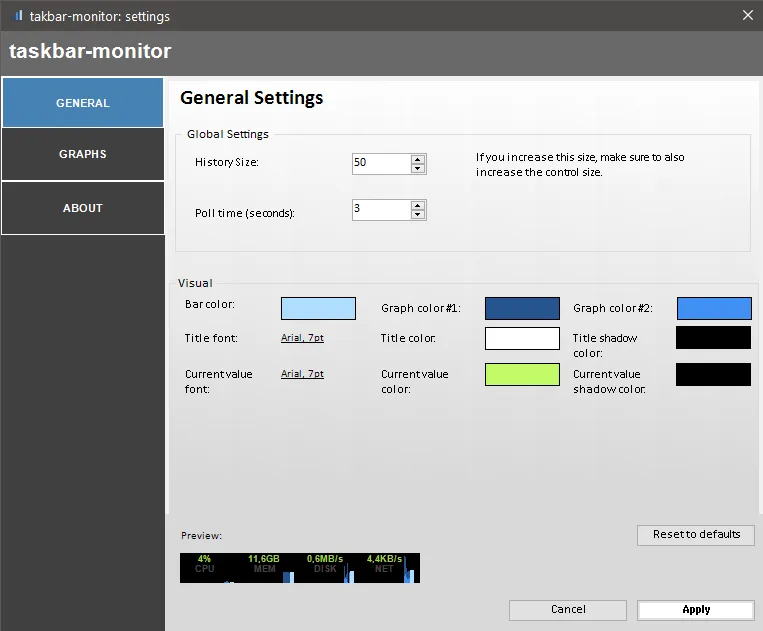
Taskbar Monitor puts resource-usage graphs on the Windows taskbar so you can watch CPU, memory, disk and network activity while working in another window. It offers summary, stacked and mirrored graph views. Its settings let you change the amount of history shown, the polling interval, fonts and graph colors. Increasing the history size also changes the space the monitor needs on the taskbar.
The publisher requires .NET Framework 4.7.2 and administrator rights for installation, which registers the monitor for all users. The publisher says that runtime is already included with Windows 10 version 1803 and later. After installation, enable Taskbar Monitor from the taskbar context menu. The publisher describes Windows 11 support as experimental because deskbands are no longer officially supported there; do not assume that every Windows 11 taskbar configuration will work. The project README directs removal through Add or Remove Programs.
What it offers
- Show CPU, memory, disk and network activity as taskbar graphs.
- Choose summary, stacked or mirrored graph views.
- Adjust history size and the polling interval.
- Customize graph colors and fonts through the settings window.
Good to know
- Windows 11 support is experimental; the publisher notes that deskbands are no longer officially supported there.
- Installation requires administrator rights and .NET Framework 4.7.2; the monitor is registered for all users.
- Changing the history size affects the taskbar space required by the monitor.
Product images
Sources
References used for this listing. Retrieval dates do not indicate hands-on testing.
- Lugarinho.tech — Taskbar Monitor product and installation guide ↗Retrieved
- Taskbar Monitor — official repository, license and uninstall instructions ↗Retrieved
- Release taskbar-monitor v0.5.4 · leandrosa81/taskbar-monitor · GitHub ↗Retrieved
- Taskbar Monitor v0.5.4 — official release assets ↗Retrieved
More in utilities
View category ↗XMeters 1.0.103.0
Keep CPU, memory, disk and network readings on the Windows taskbar with XMeters, a customizable system monitor that is free for personal use.
NetSpeedTray 2.1.7
See live upload and download speeds on the Windows taskbar, inspect network history and track data usage with the free, open-source NetSpeedTray.
Taskbar Stats 26.7.4.1
See network speed, CPU and RAM usage, and disk activity in the Windows 10 taskbar with Taskbar Stats, a free system-monitoring toolbar.

TrafficMonitor 1.86
See upload and download speeds, CPU usage and RAM usage in a floating window or the Windows taskbar. This download is TrafficMonitor 1.86 Lite for x64 Windows.
Winstep Xtreme 26.9
Organize a Windows desktop with configurable docks, tabbed shelves, menus and live widgets in Winstep Xtreme, a paid suite with a 30-day trial.