
Utilities Windows
Taskbar Stats
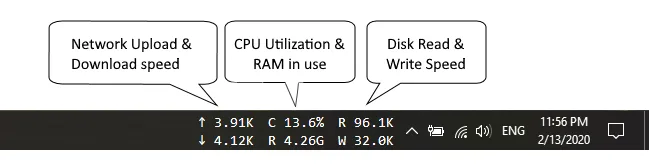
See network speed, CPU and RAM usage, and disk activity in the Windows 10 taskbar with Taskbar Stats, a free system-monitoring toolbar.
- Operating system
- Windows 10 natively; Windows 11 only via the publisher's ExplorerPatcher workaround
- Architecture
- Publisher lists 32-bit and 64-bit Windows 10; release asset is not separately architecture-labeled
- Download package
- EXE installer
Uses Windows taskbar DeskBand toolbars. No specific Windows 11 build support or installation results were verified.
Link checked · Download guidance
What is Taskbar Stats?
Taskbar Stats puts live system readings beside the Windows taskbar notification area. Its separate NetSpeed, CpuRam and DiskSpeed toolbars show network upload and download speed, CPU utilization and RAM in use, and disk read and write speed. It is useful when you want these readings visible while working in another application rather than opening a separate monitoring window. The publisher documents a one-second update interval and automatic selection of display units.
The intended native environment is Windows 10, where Taskbar Stats uses DeskBand toolbar support. After installation, use the taskbar's right-click menu, open Toolbars and select the TaskbarStats entries you need. The publisher notes that the first installation may require opening that menu twice. Windows 11 does not support these toolbars natively: the publisher's workaround requires ExplorerPatcher to restore Windows 10 taskbar support. That is a separate dependency, not built-in Windows 11 compatibility.
The publisher describes Taskbar Stats as free of charge for private and commercial use and permits distribution. Its compact, zero-configuration approach also means the publisher does not advertise configuration options. The linked EXE is the publisher's version 26.7.4.1 release; it has been checked with HTTP HEAD, not downloaded, installed or tested here.
What it offers
- Display network upload and download speed in the NetSpeed taskbar toolbar.
- Keep CPU utilization and RAM in use visible through the CpuRam toolbar.
- Show disk read and write speed through the DiskSpeed toolbar.
- Refresh statistics every second and automatically choose display units, as documented by the publisher.
Good to know
- Windows 11 lacks native DeskBand toolbar support. The publisher requires ExplorerPatcher to restore Windows 10 taskbar support; compatibility with individual Windows 11 builds is not established here.
- The publisher describes a zero-configuration utility with no options; do not expect a configurable monitoring dashboard.
Product images
Sources
References used for this listing. Retrieval dates do not indicate hands-on testing.
More in utilities
View category ↗
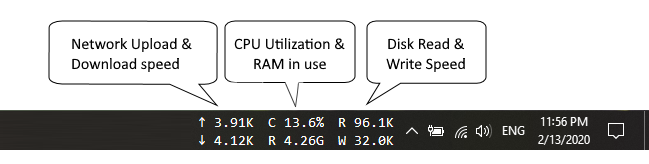
TrafficMonitor 1.86
See upload and download speeds, CPU usage and RAM usage in a floating window or the Windows taskbar. This download is TrafficMonitor 1.86 Lite for x64 Windows.
NetSpeedTray 2.1.7
See live upload and download speeds on the Windows taskbar, inspect network history and track data usage with the free, open-source NetSpeedTray.
XMeters 1.0.103.0
Keep CPU, memory, disk and network readings on the Windows taskbar with XMeters, a customizable system monitor that is free for personal use.
Taskbar Monitor 0.5.4
Display CPU, memory, disk and network graphs on the Windows taskbar, with configurable history and update intervals. Windows 11 support is experimental.
Winstep Xtreme 26.9
Organize a Windows desktop with configurable docks, tabbed shelves, menus and live widgets in Winstep Xtreme, a paid suite with a 30-day trial.