
Utilities Windows
tinySpell
Check spelling while typing or copying text with tinySpell, a free Windows utility that offers replacement words from the notification area.
- Operating system
- Windows 7, 8, 10 and 11
- Architecture
- Not specified by the publisher on the product page
- Download package
- ZIP archive containing an EXE installer and readme
Selected download is the free installed edition, not tinySpell+ or the separate portable package. Application-specific compatibility has not been independently tested.
Link checked · Download guidance
What is tinySpell?
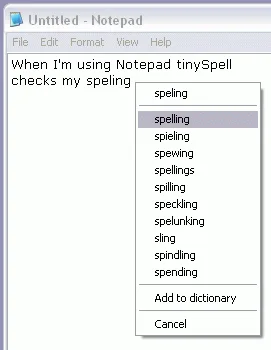
tinySpell adds spelling checks to Windows applications that do not include their own checker. It watches the words you type or checks text copied to the clipboard, then alerts you to spelling errors with an optional sound and spelling tip. Its notification-area icon gives access to suggested replacements without opening a word processor.
When an error is detected, click the tinySpell icon or use the hotkey to open the replacement list. A selected suggestion can be inserted into your document, copied to the clipboard, or both, depending on your settings. You can add words to the dictionary and choose which applications have checking enabled or disabled.
The free edition includes an American-English dictionary. Additional language dictionaries, automatic replacements and the window for correcting all clipboard errors are features of the separate paid tinySpell+ edition, not this download. The publisher lists Windows 7, 8, 10 and 11; compatibility with individual applications has not been independently tested here.
This download is the free edition's installer ZIP, not the portable package. The publisher instructs users to open the archive and run the included EXE installer. A separate portable edition is available from the same publisher and stores its settings and data in its own folder.
What it offers
- Check words as you type and check text copied to the clipboard.
- Open suggested replacement words from the notification-area icon or a hotkey.
- Insert a selected replacement into the document, copy it to the clipboard, or both.
- Add words to the dictionary and enable or disable checking for selected applications.
- Choose optional audible alerts and spelling tips.
Good to know
- The free edition includes American-English; installing additional language dictionaries requires paid tinySpell+.
- Automatic replacements and the dedicated window showing all clipboard spelling errors are paid-edition features.
Product images
Sources
References used for this listing. Retrieval dates do not indicate hands-on testing.
More in utilities
View category ↗Atlantis Word Processor Lite 5.0.6
Write and format letters, reports and longer documents with Atlantis Word Processor Lite, a free Windows word processor with optional language proofing tools.
DocPad 35.0
Edit plain-text files in tabs with DocPad, a free Windows Notepad alternative with regular-expression search, keyboard macros and restorable file backups.
Klavaro 3.13
Practice touch typing with Klavaro, a free tutor with keyboard-layout choices, exercises for keys, words and complete texts, and progress charts.


DesktopDigitalClock 6.41
Display local time and date on your Windows desktop with adjustable size, transparency, fonts and themes. DesktopDigitalClock also has a portable edition.
Gotify Tray 0.5.3
Receive Gotify server messages as Windows notifications, review message history and silence low-priority banners with this open-source desktop client.