
Utilities Windows
Turbo Studio
Package Windows applications into virtual environments with Turbo Studio. Capture installation changes, configure isolated files and registry settings, and build container images or executable packages.
- Operating system
- Publisher lists Windows Vista and later; Setup Capture requires Windows 10+ or Windows Server 2016+.
- Architecture
- Supports virtualizing 32-bit and 64-bit applications; MSI installer architecture not established.
- Download package
- MSI installer
16-bit executables cannot be virtualized directly. WinPE support is limited; applications relying on missing OS features may not work. These are documented requirements, not hands-on compatibility results.
Link checked · Download guidance
What is Turbo Studio?
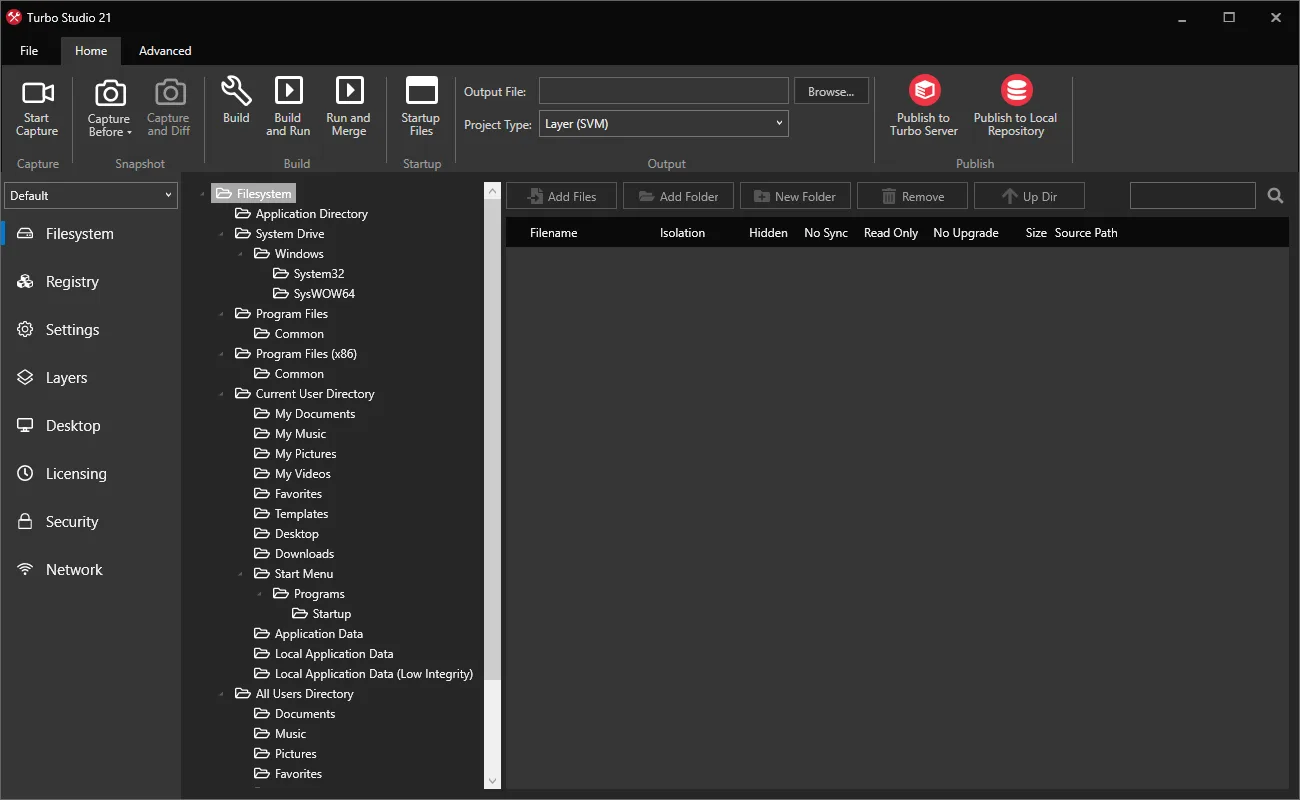
Turbo Studio is a Windows application-packaging tool for IT teams and developers who need to configure and distribute virtualized applications. It provides a visual editor for the files, registry entries, dependencies and startup settings that make up an application container. This is the authoring tool, rather than the separate Turbo Launcher client.
A project can begin with Setup Capture, before-and-after system snapshots, or a clean-environment installation. The resulting .xappl configuration can be edited before building an SVM layer, a portable executable or a standalone executable. Filesystem and registry isolation modes determine how the packaged application sees and changes resources on the host; network settings, services and runtime components can also be configured.
Choose the output type before planning deployment. A standalone/ISV EXE has no dependency on Turbo Client or Hub, but requires an Enterprise or ISV license. A portable EXE includes Turbo Client Runtime components and integrates with Turbo Hub or an on-premise server. Setup Capture requires Windows 10 or Windows Server 2016 or later and cannot capture an installer that requires a reboot. The screenshot is the publisher's documentation image of Turbo Studio 21, not a verified view of the linked 26.4.4 release.
What it offers
- Create application configurations with Setup Capture, system snapshots or clean-environment installation.
- Edit a container's virtual filesystem and registry with configurable isolation modes.
- Configure application-specific networking, virtualized services and DCOM settings.
- Include runtime dependencies such as .NET and Java in virtual application configurations.
- Build SVM layers or executable packages and publish images to Turbo Hub or Turbo Server.
Good to know
- Standalone/ISV executable output requires an Enterprise or ISV license; the availability of a download does not grant every output entitlement.
- Setup Capture requires Windows 10+ or Windows Server 2016+ and does not support installers that require a machine reboot.
- 16-bit executables are not supported directly, and WinPE compatibility is limited.
- Virtualization does not replace the licenses required for third-party applications and runtime components you redistribute.
Product images
Sources
References used for this listing. Retrieval dates do not indicate hands-on testing.
More in utilities
View category ↗
SameBoy 1.0.4
Play Game Boy and Game Boy Color titles on Windows with SameBoy, a free, open-source emulator with save states, customizable controls and a text-based debugger.

R-Studio Data Recovery 9.5 build 191850
Scan disks for deleted files, inspect recoverable content and work with disk images or virtual RAID in R-Studio for Windows. The demo cannot recover files larger than 1024 KB.
Yana 1.0.16
Organize local notes in nested collections, search their contents and keep rich text alongside code snippets with Yana, a free Windows notebook app.

Cherry Studio 2.1.8
Chat with cloud or local AI models, compare responses and build knowledge bases in Cherry Studio, an open-source desktop AI workspace for Windows.

Sandboxie Plus 1.18.8
Run Windows applications in separate sandboxes with Sandboxie. This download provides the Plus interface for managing isolated programs, settings and snapshots.