
Utilities Windows
USB Oblivion
Remove stale USB-device registry entries with USB Oblivion, a portable Windows utility with simulation mode and registry backups. Cleaning requires administrator access and an immediate restart.
- Operating system
- Publisher lists Windows 2000, XP, 2003, Vista, 2008, 7, 8, 8.1, 2012 and 10
- Architecture
- 32-bit and 64-bit Windows executables
- Download package
- ZIP archive; portable application, no installation required
Requires administrator privileges and about 3 MB of disk space. Publisher does not list Windows 11. Eject USB drives before cleaning and restart immediately afterward.
Link checked · Download guidance
What is USB Oblivion?
USB Oblivion cleans Windows registry records left by USB devices such as flash drives, disks and CD-ROMs. The publisher describes fixing broken USB-device registrations as its primary purpose, with privacy cleanup as an optional use. It is a focused maintenance tool rather than a general-purpose disk cleaner.
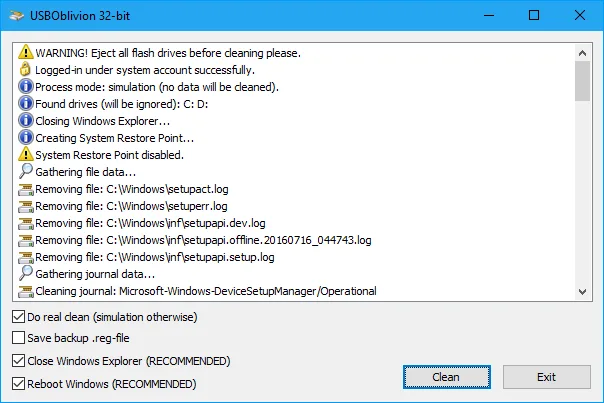
The portable program needs no installation and provides separate 32-bit and 64-bit executables. Simulation is the default command-line behavior; the -enable option performs real cleaning. Registry backup, logging and automatic operation are documented options. Eject all USB drives before cleaning, run with administrator privileges and restart Windows immediately afterward, as the publisher instructs.
Check the recovery instructions before making changes: importing a saved .reg backup requires the Windows System account, not merely administrator privileges. The publisher also documents System Restore as a recovery route. Its supported-system list ends at Windows 10; Windows 11 compatibility is not established by the sources used here. USB Oblivion cannot clean a Windows installation that runs from a USB drive.
What it offers
- Clean registry records associated with USB flash drives, disks and CD-ROMs.
- Inspect operation in simulation mode before enabling real cleaning.
- Save a .reg backup and a working log using documented command-line options.
- Use automatic operation and select an interface language through command-line parameters.
Good to know
- Cleaning requires administrator privileges, ejection of USB drives and an immediate Windows restart.
- Cannot clean Windows when the operating system is installed on a USB drive.
- Publisher's supported-system list stops at Windows 10; Windows 11 support is unconfirmed.
- Restoring a saved .reg backup requires the System account; administrator privileges alone are insufficient.
- Some HP printers using HP Smart Install need the publisher's special precautions before cleaning.
Product images
Sources
References used for this listing. Retrieval dates do not indicate hands-on testing.
More in utilities
View category ↗Vit Registry Fix 14.9.4
Scan the Windows registry for invalid entries, back up changes and manage startup items with Vit Registry Fix. The publisher offers a paid license and notes a DEP compatibility limitation.
IDrive 7.0.1.20
Back up Windows files to an IDrive cloud account or a local drive, schedule backup jobs, and restore saved files from multiple computers.

VeraCrypt 1.26.30
Create encrypted file containers or encrypt non-system partitions and USB storage with VeraCrypt. This Windows download is the portable EXE and requires administrator rights.

O&O RegEditor 16.1.6660
Edit Windows registry keys and values, search with regular expressions, and save frequently used paths with O&O RegEditor, a free portable registry editor.
FakeFlashTest 1.1.5 beta
Check USB flash drives and SD cards for falsely reported capacity with this free Windows utility. Its Quick Size Test is destructive, so back up files before testing.