
Multimedia & graphics Windows
Windows Audio Loudness Equalizer (WALE)
Automatically adjust Windows app volumes toward a target peak level with WALE, an open-source utility for reducing loudness differences between applications.
Version 0.7.5 · Direct publisher file
Link checked · Download guidance
What is Windows Audio Loudness Equalizer (WALE)?
Windows Audio Loudness Equalizer, or WALE, adjusts application volume in real time using each app's average peak level. It is intended for listeners who want automatic volume control across applications rather than repeatedly changing each app's level by hand. Its controls include a target peak level, averaging period, action timing and volume recovery behavior.
WALE works through the Windows volume system. The publisher's wiki describes individual audio sessions that can be excluded from automatic control, muted or given a relative volume adjustment. This is a volume-leveling workflow, not a promise to reshape audio with a graphic frequency equalizer. The publisher recommends using a sound driver's own Loudness Equalization feature when available, or EarTrumpet when the goal is manual per-app control.
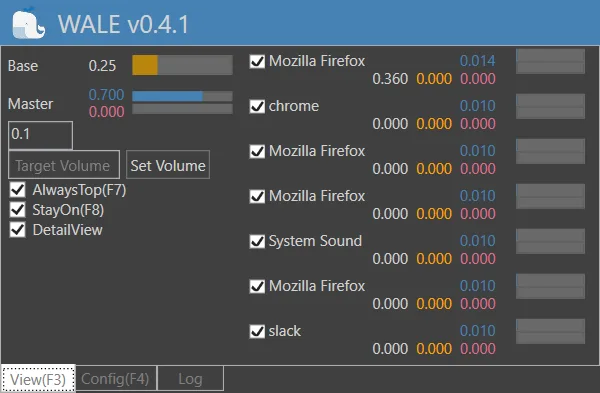
Reduce physical speaker volume before updating WALE or changing its settings. The documentation warns that combining a low target with increased speaker volume can make an uncontrolled sound unexpectedly loud if automatic control stops. The selected download is the official 0.7.5 MSI installer, dated July 5, 2023. The screenshot is a historical WALE v0.4.1 interface, not a capture of that installer or proof of current Windows compatibility.
What it offers
- Adjust application volumes automatically using average peak levels and a configurable target.
- Tune averaging duration, control timing and volume recovery behavior.
- Include or exclude individual audio sessions from automatic control.
- Inspect session levels and use manual mute or relative-volume controls.
Good to know
- The publisher warns of unexpectedly loud output if a low target is compensated for with high physical speaker volume and a sound escapes automatic control; lower speaker volume before updates or settings changes.
- The documented Windows volume range is 0.0–1.0; a target near 1.0 can leave WALE with little opportunity to regulate peaks.
- The historical wiki says session exclusions and relative-volume changes are not retained when WALE closes.
- Exact supported Windows builds and the selected MSI's architecture were not established from the inspected publisher pages; compatibility was not tested.
Product images
Sources
References used for this listing. Retrieval dates do not indicate hands-on testing.
- catright/Wale — official project, purpose, license and cautions ↗Retrieved
- WALE official wiki — usage and system description (edited May 6, 2021) ↗Retrieved
- WALE official release feed — 0.7.5 release date and fixes ↗Retrieved
- WALE 0.7.5 — official release asset catalog ↗Retrieved
- TheWindowsClub — WALE article and historical UI screenshot ↗Retrieved
More in multimedia & graphics
View category ↗
Plexamp 4.12.3
Listen to your Plex music library on Windows with gapless playback, loudness leveling, smart playlists and visualizers. Personal music requires Plex Media Server; selected features require Plex Pass.

MP3Gain 1.2.5
Adjust MP3 files to a more consistent listening volume without re-encoding. MP3Gain for Windows uses Replay Gain analysis rather than simply matching audio peaks.
Sound Lock
Limit sudden loud playback on Windows with Sound Lock, a free utility with separate limits for audio channels and output devices.

X-Wave MP3 Cutter Joiner
Cut, join and normalize MP3 and WAV audio with X-Wave MP3 Cutter Joiner, a Windows editor offered as a commercial trial.

WavePad 24.57
Record, trim and clean up audio on Windows with WavePad. Edit MP3, WAV and other formats, apply effects and process batches of files.