
Utilities Windows
WinLaunch
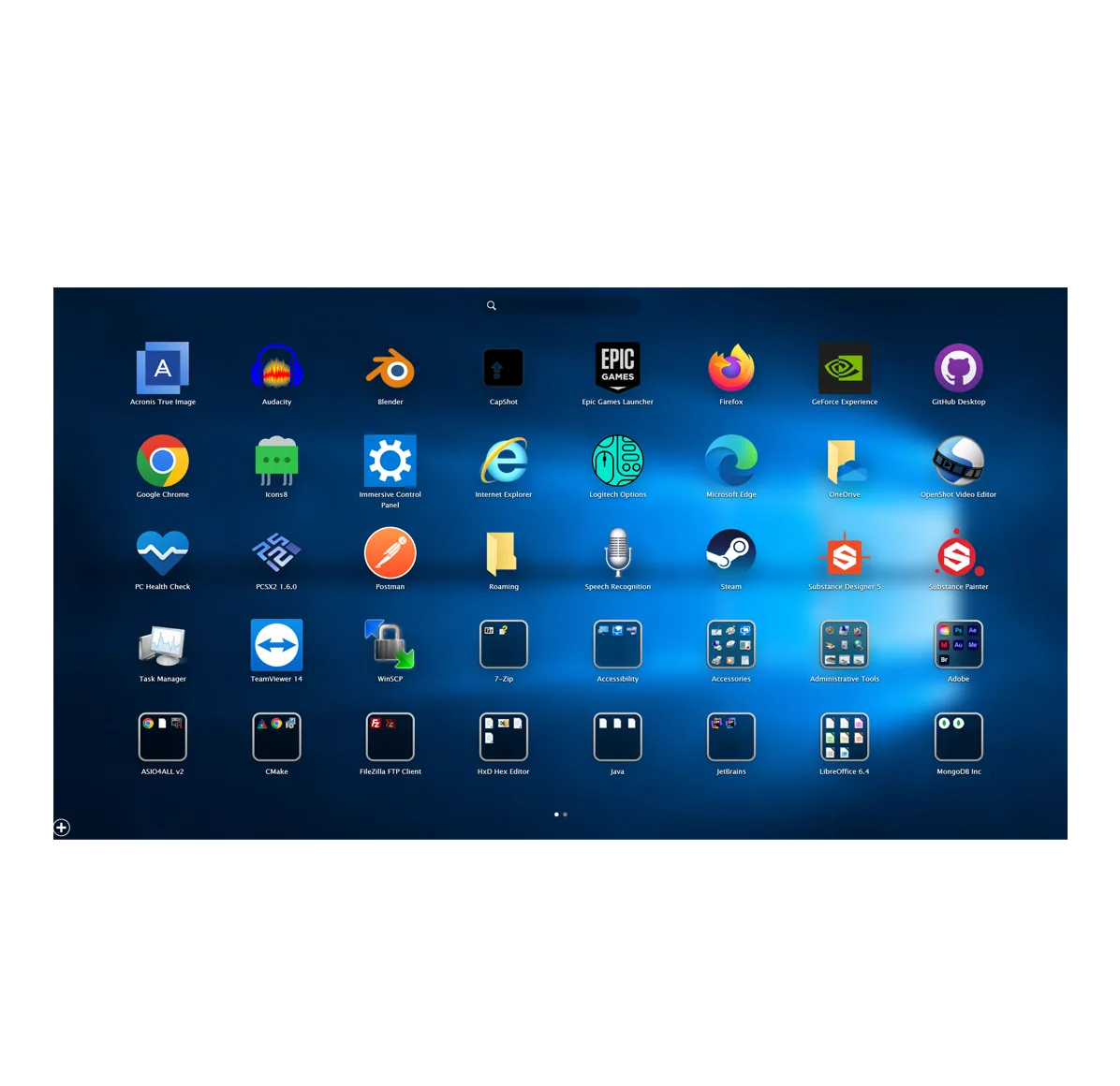
Organize Windows apps, files, folders and links in a Launchpad-style grid with WinLaunch, a free, open-source application launcher.
What is WinLaunch?
WinLaunch puts shortcuts to apps, files, folders and web links into a visual launcher for Windows. It suits people who prefer browsing an icon grid to navigating several desktop folders. Items can be grouped into named folders and spread across multiple pages, keeping related tools together without putting every shortcut on one screen.
The publisher's tutorial lists Shift + Tab, the upper-left screen corner and a double-click of the middle mouse button as default ways to open the launcher. These activation methods can be changed in settings. Add items through the toolbar or by dragging them to the hot corner; create a group by dropping one item onto another. Click empty space or repeat an activation method to dismiss the launcher.
The base application is described as free and open source, but the publisher promotes custom themes as a paid supporter feature. The linked SourceForge catalog lists an installer from November 2022. A successful HEAD check confirms that the selected URL serves a file, not that the installer has been run or that a particular current Windows build is supported. Version, processor architecture and exact Windows-version requirements were not established by the sources used here.
What it offers
- Keep shortcuts to applications, files, directories and web links in one visual launcher.
- Create folders by dragging one item onto another, then rename the group by clicking its title.
- Organize items across multiple pages and navigate by dragging or using the scroll wheel.
- Open the launcher with configurable activation methods, including a keyboard shortcut, hot corner and middle-mouse action.
Good to know
- Custom themes are promoted as a paid supporter feature rather than an unrestricted part of the free application.
- The catalog lists an installer dated November 2022; exact current Windows-build compatibility, processor architecture and application version were not verified.
Product images
Sources
References used for this listing. Retrieval dates do not indicate hands-on testing.
- WinLaunch - macOS Launchpad for Windows ↗Retrieved
- WinLaunch — About ↗Retrieved
- WinLaunch — Tutorial ↗Retrieved
- WinLaunch — SourceForge project file feed ↗Retrieved
- jensroth-git/WinLaunch — source repository ↗Retrieved
More in utilities
View category ↗XLaunchpad 1.8
Organize Windows shortcuts in a paged launcher, drag icons into folders and open the launcher from a screen corner with XLaunchpad.
ViPad 2.0.0.44
Organize Windows desktop shortcuts into labelled pads or a single tabbed launcher with ViPad, a free, open-source desktop organizer.

ScummVM 2026.4.0
Run supported classic adventure and role-playing games on Windows with ScummVM, a free game runtime that uses game data files you supply.

Draxel 6.1025
Create dimensioned 2D technical drawings in metric or inches with Draxel, a free Windows CAD application with layer folders, underlay tracing and DWG/DXF exchange.
WizFlow Flowcharter 7.57 (build 2227; publisher release listing)
Draw Windows flowcharts with reusable shapes, attached connectors and labels in WizFlow Flowcharter. The evaluation download is time-limited and restricts diagram complexity.