
Utilities Windows
WinNUT
Monitor a UPS through a Network UPS Tools server on Windows, view power and battery readings, and configure suspend or shutdown triggers with WinNUT.
Version 2.2.8719 · Direct publisher file
Link checked · Download guidance
What is WinNUT?
WinNUT is a Windows desktop client for a Network UPS Tools (NUT) server. It brings UPS readings into a WinForms interface so you can check battery charge, voltage, load and power conditions without working directly on the server. It also offers power-event notifications and configurable suspend or shutdown triggers. The linked download is the publisher's stable 2.2.8719 MSI installer, not a development build.
You need an accessible NUT server connected to the UPS; WinNUT is the monitoring client, not a replacement for that server. Install the Windows client and configure its connection for your existing NUT setup. The publisher documents additional NAS-side access settings for Synology and QNAP systems. Release 2.2.8719 uses .NET Framework 4.8, with Windows 7 SP1 identified by the publisher as the minimum system requirement. That is a published minimum, not a claim of current operating-system support or a compatibility test.
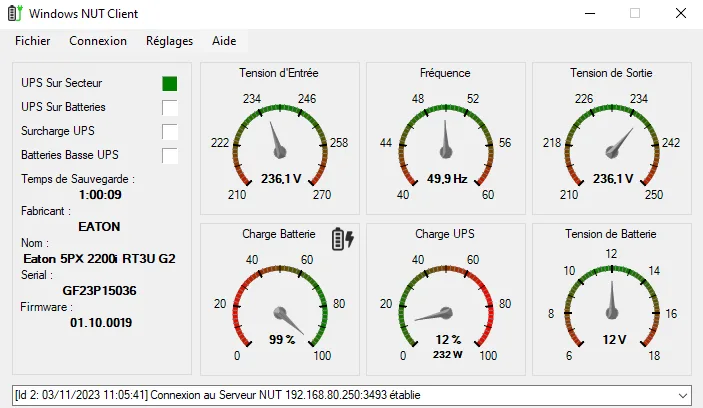
Treat the gauges as a view of the data available from your UPS and NUT server, not as independent measurements. The maintainer documents fallback readings when variables cannot be retrieved, which can make missing data appear to be real values. Check the connection and server data before relying on a displayed value for a shutdown decision. The project also discusses eventual replacement by Coco.Nut; that development plan does not make the offered stable release a new or actively tested build. The screenshot is a historical French-language interface example from the project's issue discussion, not a screenshot of a local installation or proof of the selected release's behavior.
What it offers
- View UPS battery charge, voltage and load readings supplied through a NUT server.
- Receive notifications about abnormal power conditions, including power outages.
- Configure suspend and shutdown triggers for power events.
- Inspect UPS variables and use connection logging for troubleshooting.
Good to know
- Requires a configured, reachable NUT server and its UPS data; this is a Windows client, not the UPS server.
- The maintainer documents substituted fallback readings when UPS variables cannot be retrieved; a visible number may not be a real measurement.
- The selected stable release is dated November 15, 2023 and requires .NET Framework 4.8; no local installation, hardware or shutdown testing was performed.
Product images
Sources
References used for this listing. Retrieval dates do not indicate hands-on testing.
- WinNUT - Download — Windows product listing ↗Retrieved
- WinNUT-Client — official README and license ↗Retrieved
- Release v2.2.8719 — official stable release notes ↗Retrieved
- WinNUT v2.2.8719 — official release assets ↗Retrieved
- Variable error handling (defaults/substitutes) — maintainer limitation ↗Retrieved
- UPS Power out showing wrong Wattage — historical UI screenshot context ↗Retrieved
- Legacy and Future of WinNUT — maintainer roadmap ↗Retrieved
More in utilities
View category ↗
Don't Sleep 10.22
Keep a Windows PC awake during long tasks with Don't Sleep, a portable freeware utility that blocks selected sleep, shutdown and display actions and offers a timer.

HWMonitor 1.68
Read CPU and GPU temperatures, voltages, fan speeds and other hardware sensors with CPUID HWMonitor, a free Windows monitoring utility.
AMP WinOFF 5.0.1
Schedule Windows shutdown, restart or hibernation with AMP WinOFF, a freeware utility with timer, user-idle, CPU-load and network-activity conditions.
LGTV Companion 5.7.0
Synchronize a network-connected LG WebOS TV with your Windows PC's power and idle states using LGTV Companion, a free, open-source utility.


Wallpaper Engine
Run animated scenes, videos and web wallpapers on Windows, organize playlists and create your own backgrounds with Wallpaper Engine. The Windows app is a paid, one-time purchase through Steam.